
Getting a French document translated into English used to feel like a compromise. You either paid a premium for a human translator and waited, or you rolled the dice with a free online tool and got a clunky, often inaccurate result. Thankfully, that's no longer the case.
Modern tools, especially a dedicated french to english document translator like BookTranslator.ai, use advanced AI to give you the best of both worlds. You get professional-grade translations quickly and affordably, which is a game-changer if you're working with complex files like EPUB books or formatted DOCX manuscripts.
Why AI Translators Are Changing the Game
I remember when translating a French novel or an academic paper was a massive undertaking. The turnaround times were slow, the costs were high, and early machine translation was a joke—it gave you literal, word-for-word text that completely missed the point. Today's AI platforms have completely changed that dynamic, offering a practical solution for authors, students, and businesses.
So, what’s driving this shift? A few things stand out from my experience:
- Unmatched Speed: An AI can translate an entire book in just a few minutes. A human translator would need weeks, if not months, to do the same.
- Seriously Affordable: With services like BookTranslator.ai, you can translate 100,000 words for as little as $5.99. This makes professional-quality translation a reality for almost any budget.
- Layout Preservation: This is a big one. Unlike simply copying and pasting text, these tools are built to handle file structures. They understand chapters, headings, and styling in formats like EPUB and DOCX, so your translated document looks just like the original.
- Impressive Nuance: The latest AI models have been trained on vast libraries of literature and professional writing. This allows them to grasp context, tone, and even tricky idiomatic expressions much more effectively than older technologies.
The Booming Demand for French Translation
The need for great translation has never been greater. The market for language services in Europe is booming, with France being the second-largest hub right after Germany. The numbers are staggering—the European market makes up 53.9% of the global total, which was valued at nearly $27 billion back in 2021. France's piece of that pie is about $678 million annually.
This massive market tells a clear story: people need reliable ways to convert content accurately. Whether you're an author trying to reach an English-speaking audience or a researcher needing to access French studies, finding an effective app that translates documents is no longer a nice-to-have; it's a necessity.
In this guide, I'll walk you through the entire process, from getting your source file ready to putting the final polish on the English version. You’ll see how to use these tools to get a translation that’s not just correct, but also reads naturally and honors the original author's voice.
Getting Your French Document Ready for Translation
Before you jump straight into a French-to-English document translator, a little bit of prep work goes a long, long way. Trust me, spending a few minutes on your source file now can save you hours of cleanup and frustrating edits on the other side.
Think of it this way: the quality of your original file is the single biggest factor in the quality of the final translation. A clean, well-structured document gives the AI a clear roadmap, helping it preserve every chapter break, italicized word, and heading just as you intended.
Why Your File Type Matters So Much
Not all file formats play nicely with translation software. For the absolute best results, you need a structured format that the AI can easily understand.
- DOCX Files: This is a solid choice, especially if you've been disciplined about using proper heading styles (like Heading 1, Heading 2). The AI latches onto that structure and replicates it perfectly in English. The one thing to avoid? Manual formatting, like hitting the spacebar for indents, which almost always causes layout headaches.
- EPUB Files: For books and long manuscripts, EPUB is the undisputed champion. These files have all the chapter and formatting metadata baked right in, making them the most reliable way to keep your original layout intact.
- PDF Files: Now, these can be a real minefield. A PDF is basically a picture of a document, and the text isn’t always easy for a machine to grab. Any text that’s part of an image, for instance, will be completely invisible to the translation tool.
If a PDF is all you have, particularly a scanned one, your best bet is to convert it to DOCX first. It’s an extra step, but it dramatically increases your chances of a good outcome. You can dive deeper into the process of how to translate a scanned PDF to get a handle on the specifics.
Key Takeaway: It’s simple: the cleaner your source document, the cleaner your translation. AI tools are incredibly powerful, but they thrive on well-organized files where the structure is obvious and the text is easy to read.
Spotting Common Problems Before You Start
Even the smartest AI can stumble over basic issues in a source file. I’ve seen these trip up countless projects, so keep an eye out for them.
Inconsistent Heading Styles
This one is huge. If you use big, bolded text for one chapter title and then a proper "Heading 1" style for the next, you're sending mixed signals to the AI. Take a moment to scroll through your document and apply one consistent style for all your headings. That simple act of consistency is what gives you a professionally organized final document.
File Size and Trapped Text
Most platforms, including BookTranslator.ai, have file size limits—usually around 50MB—so just double-check that you’re under the cap.
Even more important is text locked inside images, like in a chart, diagram, or a fancy title graphic. The translator will sail right past it. If that text is crucial, you'll have to manually type it into the document itself before you upload. A little bit of manual work here ensures the AI can deliver a complete, polished translation.
Navigating the AI Translation Process
Once your document is prepped and ready, it's time for the main event: the translation itself. This part is surprisingly straightforward, especially if you're using a platform designed for this exact task. Let's walk through it using BookTranslator.ai as our real-world example.
Getting started is simple. You’ll create an account, choose "French" as your source language and "English" as your target, and then upload the polished DOCX or EPUB file you prepared earlier. The interface is clean and intuitive, so you won't need a technical background to get going.
This simple workflow is key to getting a great result before the AI even touches your file.
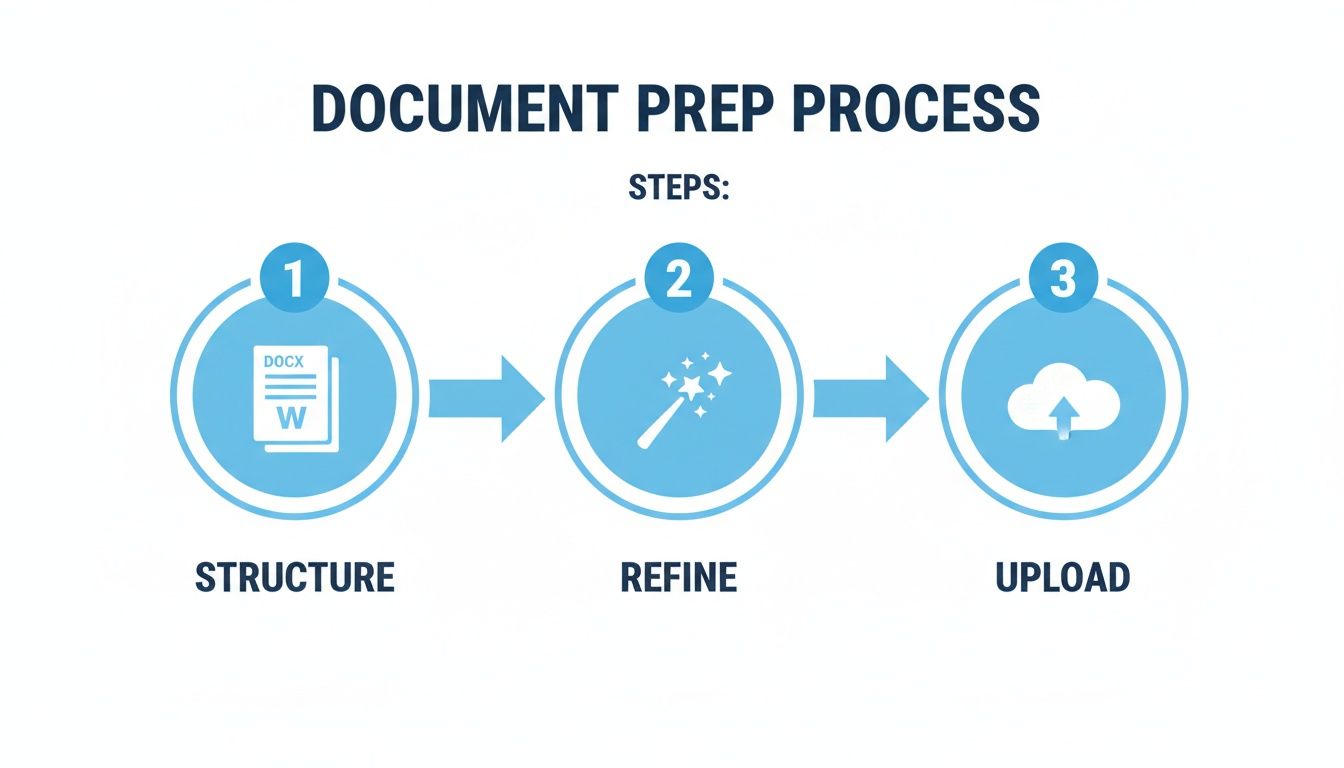
As the image shows, taking the time to structure and refine your document before you upload it makes the entire process smoother and the final translation that much better.
Choosing Your Translation Plan: Basic vs. Pro
One of the first real decisions you'll make on the platform is picking the right AI model. This isn't just about price; it's a strategic choice that comes down to the balance between cost and the level of nuance your document demands.
Here’s how I break it down for people:
- The Basic Plan is your workhorse for straightforward content. Think technical manuals, internal company memos, or academic papers where the priority is conveying information clearly and accurately. For many projects, this is all you need.
- The Pro Plan is where you turn for anything with a creative or stylistic touch. If you're translating a novel, a memoir, marketing copy, or anything where the author's voice and tone are critical, the Pro plan is a no-brainer. These advanced models are much better at picking up on idioms, cultural subtleties, and the kind of figurative language that can sound clunky when translated too literally.
For a standard 80,000-word novel, the price difference might only be a few dollars. That's a tiny investment for a translation that feels genuinely human and captures the original's spirit. Always think about your end reader when making this choice.
To make this even clearer, here's a direct comparison of the two plans available on BookTranslator.ai. This should help you pinpoint exactly which one fits your project's needs and budget.
Choosing Your Translation Plan Basic vs Pro
| Feature | Basic Plan ($5.99 / 100k words) | Pro Plan ($9.99 / 100k words) |
|---|---|---|
| Translation Quality | Standard, high accuracy for literal text | Advanced, captures nuance and style |
| Best For | Technical manuals, reports, internal docs | Novels, creative writing, marketing copy |
| Idiom Handling | Good, may require some post-editing | Excellent, understands cultural context |
| Author Voice | Preserves core meaning | Faithfully replicates tone and style |
| Metadata Preservation | Yes | Yes |
| Layout Preservation | Yes | Yes |
Ultimately, both plans deliver a solid translation, but the Pro plan adds that extra layer of polish that can make all the difference for creative works.
This kind of accessible, high-quality AI translation is quickly changing the game. In France, the document translation market is expected to surge from $2,846.96 million in 2025 to $5,070 million by 2035. Platforms offering professional-grade results for $5.99 to $9.99 per 100,000 words are making this technology available to everyone, not just large corporations.
Seeing the Bigger AI Picture
The technology powering your French-to-English document translation is part of a much wider ecosystem of AI tools. While a platform like BookTranslator.ai is purpose-built for text, other services have emerged to handle different kinds of media.
For example, a growing number of AI video translation tools are now available, each designed to tackle the unique challenges of translating spoken word, on-screen text, and subtitles. Understanding this broader context helps you appreciate how specialized solutions are being developed for every type of content imaginable. If you want to dive deeper, you can learn more about how to automate translation workflows with AI tools in our related guide.
Reviewing and Polishing Your Translated Document
Getting your translated file back is a great feeling, but the work isn't quite finished. Think of the AI as having done the heavy lifting—it’s given you a draft that’s incredibly accurate. Now, it’s your turn to add the final polish, the human touch that transforms the text from technically correct to something that feels truly natural for an English-speaking reader.
This is the stage where you fine-tune the little details that make all the difference. The AI is a brilliant, literal assistant, but your job is to infuse the text with the right tone, cultural nuances, and the author's original voice. This quality check is what separates a decent translation from a truly great one.
Building Your Quality Assurance Checklist
Instead of just reading from top to bottom, it’s far more effective to review the document with a specific checklist in mind. A methodical approach helps you catch subtle issues that a quick skim would definitely miss. It’s all about consistency and spotting those small but critical errors.
Here are the key things I always look for:
- Contextual Accuracy: Does the dialogue sound like something an English speaker would actually say? French phrasing can often be a bit more formal, so you might need to tweak sentences to make them more conversational and fluid.
- Consistency is Key: Do a quick check to make sure character names, places, and key terms are spelled the same way throughout the entire document. A simple "Find and Replace" can be your best friend here.
- Idioms and Figurative Language: This is where even the most advanced AI can trip up. Keep an eye out for phrases that sound a bit clunky or overly literal. Your job is to find an English equivalent that captures the same feeling.
Your goal isn't to re-translate the document from scratch. You’re simply refining and polishing it. In my experience, you’re usually just looking for that 5% of the text that needs a human eye to sound perfect in English.
Effective Review Strategies
How you review is just as important as what you review. Just staring at a screen for hours on end is a surefire way to miss obvious mistakes. The trick is to mix up your methods to keep your brain engaged.
One of my go-to techniques is to read a chapter out loud. It’s amazing how quickly you’ll hear awkward phrasing or clunky sentences that your eyes might have skipped over. If you stumble while reading a sentence, it almost always needs rewriting.
Another simple but powerful strategy is to just step away from the document for a day or two. When you come back to it, you’ll have a fresh perspective, making it so much easier to spot errors you previously read right over.
Achieving a high-quality final document comes down to this careful review process. For a deeper dive into getting every detail right, the principles behind mastering proofreading in transcription are surprisingly relevant here.
When to Call in a Second Opinion
Finally, don’t be afraid to ask for help. If English isn't your first language, or if this document is intended for a wide audience or publication, getting a second set of eyes on it is one of the smartest investments you can make.
A native-speaking friend, a trusted colleague, or a professional editor can offer feedback that you simply can't get on your own. They’ll instantly notice phrasing that feels just a little bit "off" and help you ensure the final output from your french to english document translator is polished, professional, and ready for its audience.
Tackling Common French to English Translation Hiccups
Even with a powerful french to english document translator, you're bound to hit a few snags. The quirks of language and document structure can sometimes trip up the most advanced AI. But don't worry—knowing how to handle these occasional issues is what separates a good translation from a great one.
Think of these problems less as failures and more as moments where a human touch is needed. The AI does the heavy lifting with speed and scale; you provide the final polish that makes all the difference.
Fixing Formatting and Layout Glitches
One of the most common issues I see is a translated layout that’s just a little… off. Maybe chapter breaks have disappeared, or perhaps your block quotes didn't carry over quite right.
Nine times out of ten, the problem isn't the translation tool—it's the source file. If your original French DOCX file was built with inconsistent styles or manual formatting hacks (like hitting the spacebar for indents), the AI is going to get confused.
Here’s the fix:
- Go Back to the Source: Open your original French document. The key is to apply clean, consistent styles. Use the built-in "Heading 1" and "Heading 2" styles for your chapters and subheadings, and use the dedicated "Block Quote" style for quotes.
- Clean Up and Try Again: Get rid of any manual formatting tricks. Once the source file is properly structured, upload it for translation again. This simple step solves probably 90% of layout problems right there.
A well-structured source document is the blueprint for a perfectly formatted translation. The AI isn't guessing; it's following the structural map you've laid out. A clean map gets you to the right destination.
Smoothing Out Awkward Idioms and Literal Translations
French is a language packed with colorful idioms that don't have a direct English equivalent. An AI might see "tomber dans les pommes" and translate it literally as "to fall in the apples," which means nothing in English. The actual meaning, of course, is "to faint."
When you read a translated phrase that sounds clunky or just plain weird, it's almost certainly a literal translation of an idiom. The fix is straightforward: identify the real meaning behind the French expression and swap in the natural English equivalent. So, "He fell in the apples" becomes "He fainted." Simple as that.
This is exactly where a human editor is indispensable. Your cultural knowledge bridges the gap that even the smartest algorithm can't always cross. The global translation market is massive—expected to grow from $41.78 billion in 2024 to $50.02 billion by 2033. Success in this industry, where Europe holds 49% of the market and North America drives nearly 35% of the demand, depends on getting these nuances right. You can read more about the growth in translation statistics to see just how critical this is.
Correcting these small but vital details ensures your translated document doesn't just make sense—it feels right and resonates with an English-speaking audience, keeping the spirit of the original text alive.
A Few Common Questions
If you're new to using AI for document translation, you've probably got a few questions. It's smart to be curious. Here are some straightforward answers to the things people ask us most often.
Can AI Really Handle Literary Nuance?
This is a big one, especially for novelists and creative writers. Modern AI models, particularly the 'Pro' versions you'll find on platforms like BookTranslator.ai, are trained on massive libraries of literature. They've gotten surprisingly good at picking up on tone, context, and complex sentence structures.
The real strength of AI is its incredible consistency across hundreds of pages. That said, I always recommend a final human review for creative projects. Think of the AI as producing a 98% publication-ready draft. A human editor can then swoop in to polish any culturally specific idioms or subtle humor that might not land perfectly.
What’s the Best File Format to Use?
Hands down, EPUB is the gold standard for books. It’s built with structure in mind—chapters, headings, styling—which gives the AI a perfect map to follow, preserving your layout almost flawlessly.
If you only have a DOCX file, that works well too, just make sure you’re using proper heading styles (Heading 1, Heading 2, etc.) to mark your sections. The format to avoid, if you can, is PDF. PDFs often treat text like a flat image, which makes it tough for the AI to pull out the content and reassemble it correctly.
Pro Tip: The single best thing you can do for a perfect translation layout is to use style-based formatting in your source file. Avoid manual tricks like hitting the spacebar for indents. A clean, structured document is your ticket to a beautifully formatted result.
How Much Does Translating a Book Actually Cost?
This is where AI services have really changed the game. Let's take an 80,000-word novel as an example. Using a tool like BookTranslator.ai, you’d be looking at around $4.79 on a Basic plan or $7.99 on a Pro plan.
Compare that to traditional translation agencies, which could easily quote you thousands of dollars for the same manuscript. The pay-per-book model makes professional-level translation accessible for authors and researchers without locking them into a pricey subscription.
Will the Translation Mess Up My Formatting?
Not if you start with a clean source file. A good document translator is designed to recognize and replicate the structure of your original. This means it will preserve all the important stuff:
- Chapter breaks and titles
- Headings and subheadings
- Bold and italic text
- Blockquotes and paragraph indents
It all comes down to preparation. When you give the AI a well-structured French document that uses built-in styles, you're essentially handing it a blueprint. The result? A translated English document that mirrors the professional layout of your original.
Ready to see how fast and accurate this can be? With BookTranslator.ai, you can get your French documents into English in just a few minutes, all while keeping your original layout intact. Try it now and bring your work to a global audience.