
So, you need to translate a scanned PDF. The first thing to understand is that you're not actually working with text—you're working with a picture of text. Before any translation can happen, you have to pull the actual words out of that image using something called Optical Character Recognition (OCR).
Only after you have clean, readable text can you feed it into a translation tool. It’s a multi-step process, but absolutely doable.
Why Translating Scanned PDFs Is a Unique Challenge
Trying to translate a scanned document directly is a bit like showing a photograph of a French novel to an English-speaking friend and asking them to read it aloud. They can see the page, but they can't interact with the words. Translation software sees a scanned PDF the same way: as one big, flat image.
This is the core reason you can't just copy-paste the text like you would from a regular PDF or a Word document. The entire workflow revolves around one crucial task: turning that static picture of words back into editable, digital text that a machine can understand.
From there, the journey from a scanned image to a fully translated document breaks down into a few distinct stages. Each one is important, and cutting corners on an early step will almost always cause headaches later.
To give you a clearer picture, here’s a breakdown of the entire workflow.
From Scanned PDF to Translated Document: A 4-Stage Overview
This table maps out the four main stages you'll go through, from the initial scan to the final, translated document.
| Stage | Goal | Key Tools & Techniques |
|---|---|---|
| 1. Conversion | Extract editable text from the image-based PDF. | OCR software (e.g., Adobe Acrobat Pro, Nanonets), high-resolution scanning. |
| 2. Preparation | Clean up OCR errors and format the text for translation. | Text editors, find-and-replace functions, manual proofreading. |
| 3. Translation | Convert the cleaned text into the target language. | AI translation platforms like BookTranslator.ai, CAT tools. |
| 4. Reassembly | Re-integrate the translated text with the original layout and images. | DTP software (e.g., Adobe InDesign), PDF editors, manual formatting. |
Getting a high-quality result depends on giving each of these stages the attention it needs.
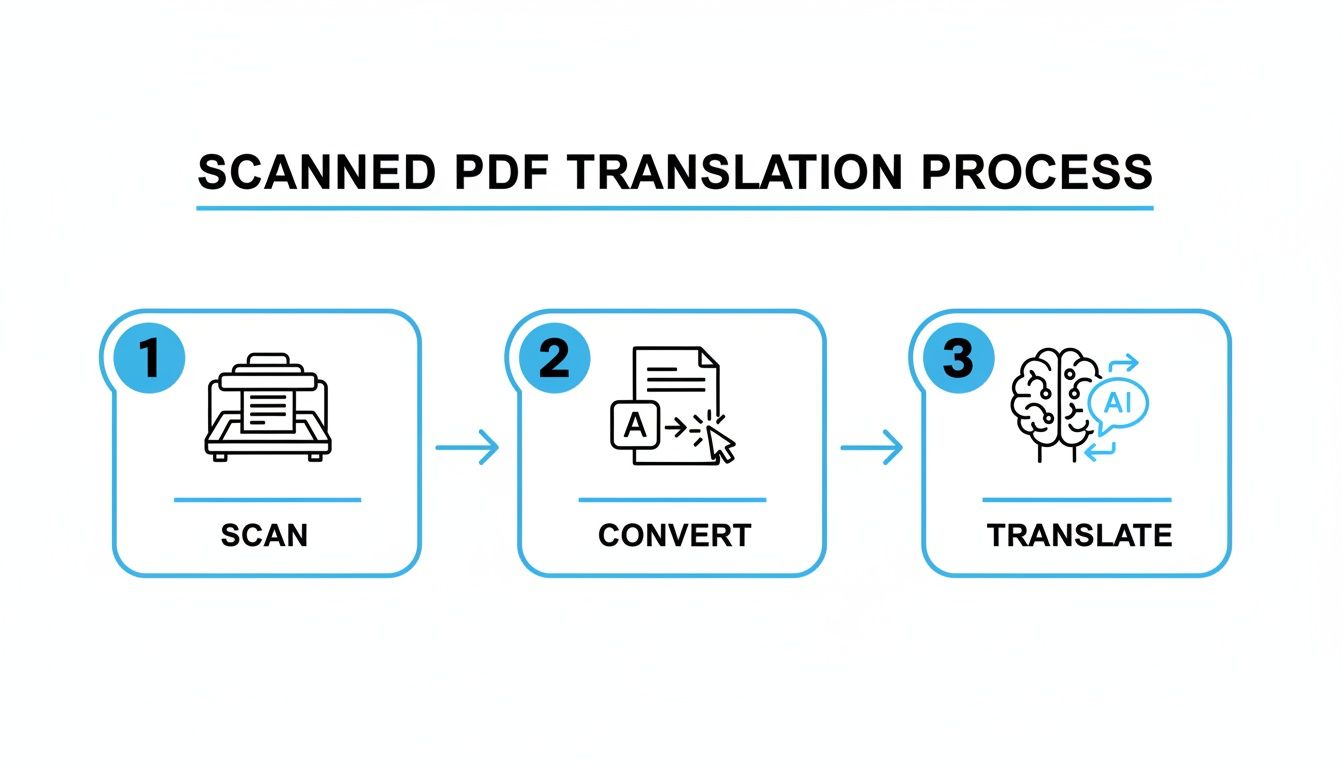
As you can see, the process flows from a static format to a dynamic one, gets translated, and is then carefully put back together. Once you get the hang of this workflow, you can tackle just about any scanned document, confident you can preserve its original look and feel.
Before a single word gets translated, you have to tackle a more fundamental problem: your scanned PDF is just a picture. Computers can’t read a picture of text, so your first job is to turn it into something they can understand. This is where Optical Character Recognition (OCR) technology saves the day. It’s the essential bridge between a static image and editable, workable text.
Honestly, the success of your entire translation project hinges on how well this first step goes. It’s a classic “garbage in, garbage out” situation. Getting the OCR right isn’t just about pulling out words; it's about building a solid foundation that makes every subsequent step cleaner and faster.
Choosing Your OCR Tool
You’ve got a few different paths you can take here, and the right one really depends on your project's needs.
- Integrated Solutions: If you’re already working within the Adobe ecosystem, Adobe Acrobat Pro has a surprisingly powerful built-in OCR function. Keeping everything in one app is a huge time-saver.
- Dedicated OCR Platforms: For a really messy or large-scale project, dedicated tools are often worth the investment. They tend to offer much higher accuracy, especially with tricky layouts or less-than-perfect scans. We dive deeper into this in our guide on OCR and translation.
- Online Converters: For a quick one-off document, a free online tool might do the trick. Just be cautious about file size limits, accuracy, and what happens to your data once you upload it.
Once the OCR has done its job, you're left with raw text that needs to be organized. Think of it like how venture capitalists extract data from PDF pitch decks automatically to speed up their analysis—you're doing the same thing, just for translation.
Best Practices for High-Quality OCR
Great OCR results don't just happen by magic. You need to feed the machine good-quality material to get good-quality text back.
I can't stress this enough: the quality of your scan is everything. A blurry, low-resolution image will give you a jumbled mess of misread characters, leaving you with a massive cleanup job before you even think about translating.
To give your OCR software the best shot at success, start with these simple rules:
- Scan at High Resolution: Don't settle for anything less than 300 DPI (dots per inch). This is the gold standard and ensures the image is sharp enough for the software to accurately identify each character.
- Select the Correct Language: Before you hit "start," tell your OCR tool what language the document is in. This simple setting helps it correctly recognize unique characters, accents, and diacritics.
- Ensure Good Lighting and Contrast: Scan your document in a well-lit area to avoid shadows. A clean, evenly lit page with strong contrast between the text and background makes a world of difference.
Mastering these skills is becoming more critical than ever. The translation services market, which is built on workflows like this, was valued at a staggering USD 956.81 billion in 2025. It’s projected to climb to an incredible USD 1.18 trillion by 2035, a clear sign of just how much the world needs high-quality document translation. You can find more details about this market growth on Research Nester.
Preparing Your Extracted Text for Translation
Once your OCR software has worked its magic and pulled the text from the scanned PDF, you're left with the raw ingredients. It’s tempting to jump right into translation with this text, but that’s a classic mistake that almost guarantees a messy outcome.
Let’s be real: no OCR tool is perfect. Tiny errors—a misread letter, weird spacing, or a paragraph that’s been chopped in half—are bound to sneak in. These might look like small glitches, but they can completely throw off an AI translation engine. These systems are trained on clean, grammatically sound text, so feeding them garbled input is a recipe for awkward, nonsensical translations. A few minutes spent cleaning up the text is the best investment you can make for an accurate final product.
The Essential Cleanup Checklist
Your goal here is simple: make the text clean, logical, and structurally intact. Think of it as prepping your canvas before you start painting.
Here’s a practical checklist I always run through:
- Fix Obvious Character Errors: Keep an eye out for common OCR blunders, like mistaking "l" for "1," "O" for "0," or "rn" for "m." A quick skim or a simple find-and-replace search usually catches most of these.
- Correct Spacing and Punctuation: OCR software often gets trigger-happy with spaces or forgets punctuation altogether. Make sure sentences flow correctly and have proper endings.
- Rejoin Broken Paragraphs: It's incredibly common for OCR to break a single paragraph into multiple lines. You'll need to manually stitch these back together to maintain the author's original train of thought.
For anyone looking to translate a scanned PDF of a book, manual, or a long report, this cleanup phase is absolutely critical. It ensures the AI is working with high-quality source material, which is exactly what sophisticated tools need to deliver their best work.
Formatting for Long-Form Content
With the text itself cleaned up, it's time to think about structure. This is especially true for longer documents like books. A plain text file loses all the vital organizational cues—chapter breaks, headings, and subheadings. For a platform like BookTranslator.ai, retaining that structure is the key to getting a professionally formatted translation back.
This is where converting your text into an EPUB file makes a world of difference. An EPUB is more than just a text file; it’s a smart container that holds both your content and its structure. It’s the ideal format for feeding into advanced translation systems.
The EPUB format is like giving the AI a blueprint. It says, "This is a chapter title," or "Start a new section here." This guidance helps the AI not only translate the words accurately but also preserve the document’s original layout and organization.
Creating an EPUB is surprisingly easy with free and powerful software like Calibre. It’s a fantastic open-source tool that gives you full control over your document’s structure before you send it off for translation.
With a tool like Calibre, you can take a simple text or Word document and turn it into a perfectly structured EPUB. This sets you up for a far smoother and more precise translation. By taking these extra steps, you’re not just translating words anymore—you’re preserving the entire soul of the document.
Choosing the Right AI Translation Tool
Now that your text is cleaned up and properly structured, it’s time to pick your translation engine. It's a common mistake to think all translation tools are basically the same. But when you need to translate a scanned PDF of something complex, like a book or a technical manual, you quickly see the difference between a generic tool and a specialized platform.
General-purpose translators are great for a quick phrase or an email, but they often fall apart when faced with long, structured documents. They can miss the author's tone, create awkward transitions between paragraphs, and misinterpret the specific vocabulary common in academic or literary works. This is where a purpose-built tool really shines.
Why Specialized Tools Are a Smarter Choice
For any project that started as a scanned document, particularly a long one, a platform like BookTranslator.ai is engineered to handle these exact challenges. It's not just about swapping words; it’s designed to manage large files and, crucially, to respect the structure you just worked so hard to preserve in your EPUB.
What does that mean in practice? It recognizes things like chapters, headings, and section breaks, so the translated version mirrors the original's layout. This dedication to long-form content leads to a much more consistent and readable final product. If you're curious about the tech behind this, having a basic understanding of Large Language Models (LLMs) can be helpful, as they are the engines driving many of these advanced AI tools.
Thinking About Cost and Your Workflow
The pricing structure is another practical point to consider. A lot of professional software forces you into a hefty monthly subscription, which is just not practical if you're only translating a document or two. BookTranslator.ai, on the other hand, operates on a pay-per-book model. This makes it a much more direct and budget-friendly option for one-off projects.
This shift toward specialized tools isn't happening in a vacuum. The market for translation management systems was valued at USD 2.16 billion in 2024 and is expected to reach USD 5.47 billion by 2030. That's a compound annual growth rate of 17.2%, fueled by the explosion of digital content needing accurate, context-aware translation.
Picking the right tool is about more than just accurate words; it’s about maintaining the soul of the original document. Specialized platforms give you the power and precision needed for a truly professional result. To see how different tools stack up, you can check out our guide on the best document translation software.
Reformatting and Finalizing Your Translated Document
You’ve got the translated text back from the AI, and now comes the final—and arguably most important—part of the job. This is where you roll up your sleeves and turn that raw text back into a polished document that looks just like the original.
It’s easy to think the AI's output is the end of the road, but that's a common mistake. A real quality check is absolutely essential. Even the most sophisticated AI can stumble over subtle cultural references, industry-specific terms, or the exact tone you were going for. This human touch is what elevates a decent translation to a professional one. You're not just hunting for typos; you're making sure the message lands perfectly.
The Quality Assurance Framework
Before you even think about layouts and fonts, focus on the text itself. Getting the content right first will save you a world of headache later. If you start reformatting too early, you'll just have to do it all over again every time you find a text error.
Here's a straightforward approach to guide your review:
- Accuracy Check: Go through the translation sentence by sentence, comparing it to the original. Did it nail the meaning? Or did it miss something subtle, or worse, add something that wasn't there?
- Consistency Review: Make sure key terms are handled the same way every time they appear. Inconsistent terminology is a dead giveaway of a sloppy translation and can really confuse your readers.
- Tone and Style Edit: Does the translated version feel like the original? An academic text needs to sound scholarly, whereas a user guide should be simple and direct. For high-stakes projects, it's always worth getting a native speaker of the target language to give it a final read-through.
Once you’re confident the text is solid, you can shift gears and focus on the visual side of things.
Rebuilding the Original Layout
This is where you put all the pieces back together. Integrating the translated text into the original layout takes a good eye for detail and a bit of patience. You’ll need to fire up a program like Microsoft Word or a more powerful desktop publishing tool like Adobe InDesign and start reconstructing the document.
The real goal here is to create a document that's a perfect mirror of the original, just in a new language. You’ll be carefully placing text blocks, dropping in the images and charts you set aside earlier, and doing your best to match the original fonts and spacing.
This part of the process really highlights why all that prep work was so crucial. You’ll probably find yourself making small adjustments to the layout, since some languages take up more space than others (looking at you, German). For a deeper dive, check out our article on the top tools for translation-friendly formatting to help streamline this step.
With every element perfectly in place, the last thing to do is export your masterpiece as a fresh, high-quality PDF. That's it—you've successfully managed to translate a scanned PDF, turning what was once a static image into a professional, accessible document. And these skills are more in-demand than ever. The translation services market is projected to hit USD 57.27 billion by 2035, a huge jump driven by the global need for content like this. You can read more about this booming market at Business Research Insights.
Frequently Asked Questions
When you're diving into the world of translating a scanned PDF, a few questions always seem to pop up. People often wonder about everything from the cost and quality to whether they can keep the original layout intact. Getting these things straight from the start can save you a lot of headaches down the road.
Let's walk through some of the most common questions I hear and get you some clear, practical answers.
Can I Translate a Scanned PDF for Free
The short answer is yes, you can… but it’s a classic case of “you get what you pay for.” To do it for free, you'd have to piece together a workflow using different free tools—first an online OCR service to pull the text out, and then a free machine translator to convert it.
The trade-offs become apparent pretty quickly. Free OCR tools often struggle with accuracy, especially if your scan isn't perfect, leaving you with a lot of manual text cleanup. On top of that, free translation websites are generally built for short, simple sentences. They can easily miss the subtle context and flow needed for a book, an academic paper, or any other complex document.
Honestly, if you're aiming for a high-quality result that captures the author's voice and can be professionally formatted, investing in a structured workflow with specialized tools is the only way to go. It saves a massive amount of time and delivers a far more accurate translation.
How Do I Ensure the Translation Quality Is High
Getting a top-notch translation isn't just about the final step; it's a commitment to quality from the very beginning. Every stage of the process builds on the last one.
To get the best possible results, you have to nail each part of the workflow:
- Start with a Superior Scan: Garbage in, garbage out. The quality of your source scan is everything. I always recommend scanning at a high resolution—300 DPI (dots per inch) is the standard for a reason. This gives your OCR software a crystal-clear image to work with and drastically cuts down on recognition errors.
- Meticulously Clean the OCR Output: Once the text is extracted, it’s time to proofread. This is non-negotiable. Hunt down and fix any misread characters, correct weird spacing, and stitch broken paragraphs back together. A clean, accurate source text is the single biggest factor in getting a good AI translation.
- Choose the Right Tool for the Job: Not all translation tools are created equal. You need to pick one that's designed for your specific type of content. A platform like BookTranslator.ai, for example, is built for long-form content and will easily outperform a generic tool when you're translating entire books or detailed reports.
- Conduct a Final Review: After the translation is done, it's time for a final quality check. The best-case scenario is having a bilingual person read through it to check for accuracy, cultural nuances, and consistent tone. That final human touch is what elevates a translation from just "good" to "great."
Will Translating a Scanned PDF Keep My Formatting
Unfortunately, no. The moment you use OCR to extract text, you are fundamentally separating the words from the document’s original design—the layout, images, and styling are all left behind. The translation engine only sees and works with the raw text.
The key takeaway here is that preserving the format is a manual reconstruction job. There's no magic button to automatically translate a scanned PDF and have the layout stay perfectly intact. Think of it as a separate, deliberate stage in the workflow.
To get that original look back, you have to manually rebuild the document with the new, translated text. This usually involves a few key steps:
- Saving all the images and graphics from the original PDF as separate files.
- Placing your newly translated text into a word processor or a desktop publishing program.
- Re-inserting the images and tables you saved into their correct positions within the new text.
- Manually reapplying styles like fonts, headings, and spacing to mirror the source document.
This is where using a format like EPUB during the translation step really shines. As we covered earlier, it preserves the document’s structure (like chapters and headings), which makes this final reformatting stage much faster and more organized.
Ready to transform your scanned books into perfectly translated EPUBs? With BookTranslator.ai, you can translate entire books while preserving the original structure and tone. Get started with our simple pay-per-book model today. Translate your book now.