
So, you have a German PDF that needs to be in English. Before you even think about translation software, there’s one critical check you have to make. It’s the difference between a five-minute job and a multi-hour headache. You need to figure out if your PDF is "native" or "scanned."
Getting this right from the start is everything. It dictates the tools you’ll use, the steps you’ll take, and ultimately, the quality of your final English document.
First, Figure Out What Kind of German PDF You're Dealing With
Not all PDFs are made the same. The real question is: was your document born digital, or is it just a picture of a paper page?
Think of a native PDF as a document created on a computer and saved directly from a program like Microsoft Word or Adobe InDesign. The text inside is real, live text. You can click on it, highlight a sentence, and copy-paste it into another application. This is the best-case scenario.
A scanned PDF, on the other hand, is basically a photograph. Someone took a physical document—like an old contract, a page from a book, or a signed form—and ran it through a scanner. To your computer, the file isn't text; it's just one big image made of pixels. You can't select individual words any more than you could in a JPEG.
How to Tell Them Apart: The Two-Second Test
Luckily, identifying your PDF type is incredibly simple. Just open the file and try this:
- Can you click and drag your cursor to highlight a sentence? If the text turns blue (or your system's highlight color), congratulations. You have a native PDF. Your next step will be extracting this text.
- Does your cursor draw a box around a section of the page? If you can't select individual words and can only select a rectangular area, you're looking at a scanned PDF. This means you'll need to use Optical Character Recognition (OCR) before you can do anything else.
This simple test is non-negotiable. Trying to feed a scanned PDF into a text-based translator will just result in an error message or a completely blank document. You have to convert the image to text first.
The demand for this kind of document intelligence is massive. The Germany language translation software market hit about $5.4 billion USD in 2024 and is on track to nearly double, reaching a projected $9.7 billion USD by 2035. You can read more about this growth to see where the technology is headed.
To make it even clearer, here’s a quick breakdown of the differences.
Native PDF vs. Scanned PDF Quick Comparison
This table breaks down the key differences between native and scanned PDFs to help you quickly identify your file type and understand the translation path for each.
| Characteristic | Native PDF | Scanned PDF (Image-based) |
|---|---|---|
| Creation Method | Saved directly from a software application (e.g., Word, InDesign). | Created by scanning a physical paper document. |
| Text Selectable? | Yes, you can highlight, copy, and paste text. | No, the text is part of a flat image. |
| Searchable? | Yes, you can use Ctrl+F (or Cmd+F) to find words. | No, not until after OCR is performed. |
| Typical Use Case | Reports, eBooks, modern academic papers, invoices. | Old archives, signed contracts, historical documents, letters. |
| Translation Path | Direct text extraction → Translation | OCR to extract text → Translation |
Knowing your starting point is half the battle. If you have a modern university paper, it's almost certainly a native PDF. If it's a digitized record from a historical archive, you can bet it's scanned. Identifying this upfront sets you on the right path for a smooth and accurate translation.
Getting The German Text Ready For Translation
So, you've figured out if your PDF is native or scanned. Great. The next move is to pull the German text out in a clean, usable format. This isn't just a simple copy-and-paste job; think of it as laying the foundation for a high-quality translation. How you handle this stage directly shapes the quality of the final English document.
For native PDFs, the text is already there, ready to be selected. But if you just drag your cursor over everything and paste it into a translator, you’ll likely end up with a mess of broken lines and jumbled paragraphs. This is especially true for anything with a multi-column layout. The trick is to use a method that understands and respects the document's original structure.
Extracting Text From Native PDFs
A much better way forward is to use a dedicated PDF-to-text converter or a proper PDF editor. These tools are built to analyze how a document flows and extract the text in the correct reading order. Taking this extra step can save you a ton of time you'd otherwise spend manually fixing line breaks and reordering sentences before you even get to convert german pdf to english.
Imagine a two-column academic paper. If you just copy-paste, the text will jump from the left column to the right on every single line, making it completely unreadable. A good extraction tool reads all the way down the first column before moving to the second, just like a human would.
Using OCR For Scanned German Documents
If you're dealing with a scanned PDF, you'll need to run it through Optical Character Recognition (OCR). This tech essentially "reads" the image of the page and converts it into editable, digital text. Modern OCR is fantastic, but getting it right with German means paying attention to a few specific details.
To get the most accurate results, keep these things in mind:
- Language Setting: This is crucial. Always set the OCR software's language to German. This tells the tool to expect and correctly identify special characters like umlauts (ä, ö, ü) and the Eszett (ß), which massively boosts accuracy.
- Image Quality: A sharp, high-resolution scan makes all the difference. If your PDF is blurry, dark, or has low contrast, the OCR output will be full of mistakes.
- Proofreading: Never assume the OCR is perfect. Spend a few minutes scanning the extracted German text for obvious errors before you translate it. It's a small time investment that pays off big.
This precision is important. Germany's language services market is the biggest in Europe, with Language Service Providers (LSPs) generating over €1.25 billion back in 2017. The country is a major player in translation technology, so the tools are there. You can discover more about Germany's language tech industry here.
Key Takeaway: The quality of your text extraction—whether it's from a native PDF or via OCR—directly determines the maximum possible quality of your final translation. It’s the old "garbage in, garbage out" principle. A clean source text is the only way to get an accurate, readable English document.
For a deeper dive into this process, check out our guide on OCR and translation.
3. Choose the Right Translation Tool for Your Project
Okay, you've successfully extracted clean German text from your PDF. Now comes the crucial part: choosing how to actually translate it. This isn't just about picking the first tool you find on Google. It's about matching the method to your specific goal, because your choice will directly impact the final document's speed, cost, and, most importantly, its professional appearance.
The demand for good translation is huge. The market is projected to hit $41.78 billion in 2024, largely because a whopping 75% of people prefer to buy products in their own language. Clearly, getting your translation right matters. You can dig deeper into these translation market trends here if you're curious.
The decision tree below recaps the first critical step we covered—figuring out if your PDF is native or scanned to get your text ready for these tools.
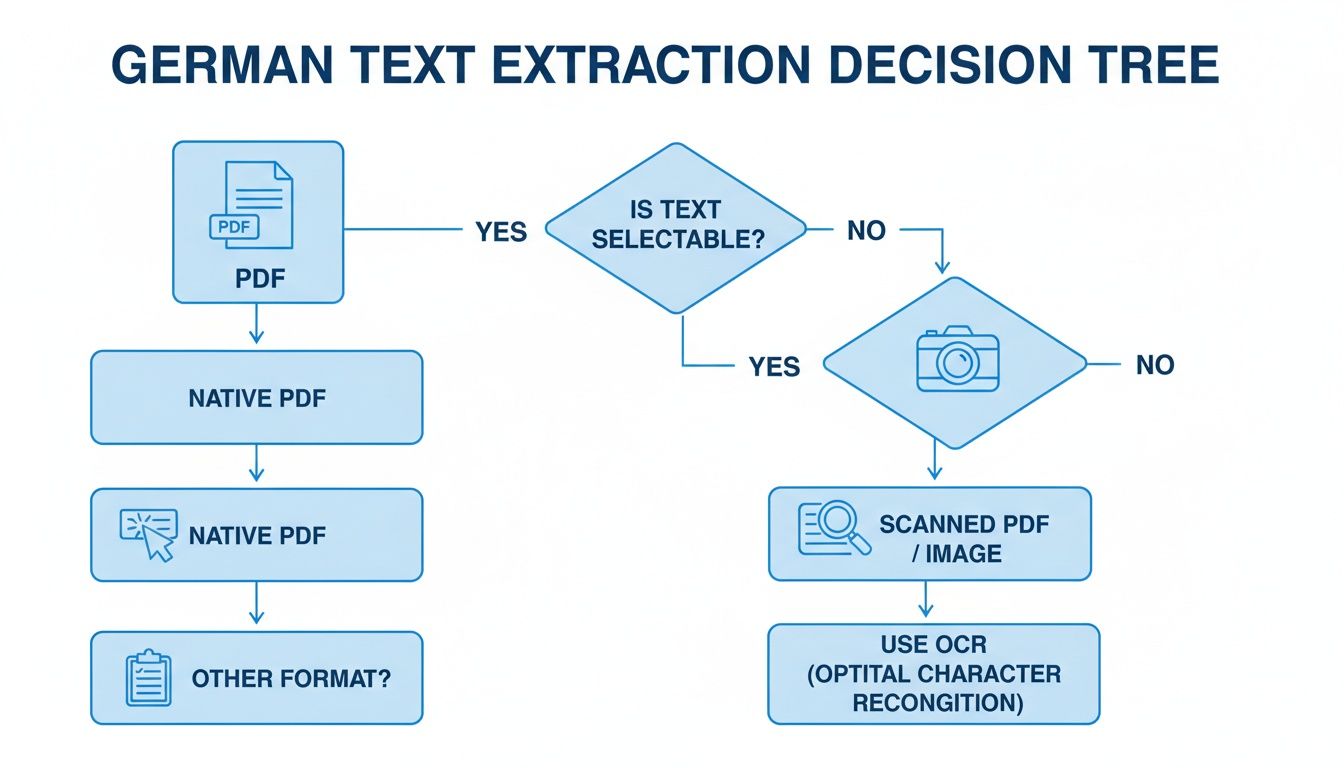
As you can see, your path splits depending on whether the text is selectable (native) or needs OCR (scanned). That first choice sets the stage for everything that follows.
The Classic Trade-Off: Speed vs. Formatting
For quick, informal jobs, free online tools like DeepL or Google Translate are fantastic. You can paste your extracted German text and get an English version in seconds. If you just need to get the gist of an article or a short email, this is often all you need.
The major drawback? Formatting. The moment you paste the translated text back into a new document, you lose everything—headings, bold text, italics, paragraph breaks, and chapter divisions. Manually rebuilding the layout for a long document is a soul-crushing task. I've been there, and it's not fun.
- Scenario: You have a 10-page German user manual in a simple text format. You just need to understand the instructions for personal use.
- Best Approach: A free online translator is perfect here. The speed is well worth the minimal effort of re-reading plain text.
My Personal Tip: Even with the best machine translation tools, German-to-English can be tricky. I've found that DeepL often produces more natural-sounding translations for European language pairs because of its specific training data. It's usually my first stop for a quick check.
When Layout Is Everything: A Smarter Workflow
But what if you need to convert a German PDF to English and the structure is non-negotiable? Think of an academic paper with citations, a technical manual with diagrams, or a novel with carefully laid-out chapters. For these projects, preserving the layout is just as important as the translation itself.
This is where you need a more advanced workflow. Instead of just translating raw text, your goal should be to translate the entire document structure.
Here’s a reliable way to do it:
- Convert to EPUB: First, take your clean German text and convert it into an EPUB file. EPUB is an e-book format specifically designed to hold structural information like chapters, headings, and styling.
- Use a Specialized Tool: Next, use a platform built for translating structured documents, like BookTranslator.ai.
This method completely sidesteps the formatting loss. A service like BookTranslator.ai reads the German EPUB, translates the content while keeping the underlying code for headings and chapters intact, and outputs a fully formatted English EPUB. You end up with a professional, readable document that mirrors the original's layout, saving you hours of manual reformatting.
Exploring other software options for translating documents can give you more context on why specialized tools are often the right call for serious projects.
To help you decide, here’s a quick breakdown of the methods we've discussed.
Translation Method Comparison
This table offers a clear comparison of different translation methods, helping you decide which approach best suits your project's needs for speed, accuracy, and formatting.
| Method | Best For | Layout Preservation | Cost |
|---|---|---|---|
| Free Online Tools | Quick, informal gists of short documents or emails. | None. You lose all formatting. | Free |
| CAT Tools (Pro) | Professional translators working on complex projects. | High. Preserves tags and structure. | High (Software & labor) |
| Convert to EPUB & Use BookTranslator.ai | Long, structured documents like books or manuals where layout is critical. | Excellent. Mirrors the original file. | Moderate (Service fee) |
Ultimately, the right tool depends entirely on your end goal. For a quick look, free tools are fine. For anything that needs to look professional and maintain its original structure, investing a little in a specialized workflow will save you a massive headache.
A Practical Walkthrough for Perfect Formatting
When you need to convert a German PDF to English and keep the professional layout intact, just copying and pasting won't cut it. That approach falls apart with complex documents like business reports, academic papers, or entire books.
For those projects, you need a workflow that respects the document's structure. Here’s a reliable technique I've used countless times: convert the document to an EPUB file first. This method isn't just about translating the words; it’s about translating the entire document—text, chapters, headings, and all. It’s the difference between getting a clean, professional English version and a jumbled mess that takes hours to fix.
From Text to a Structured EPUB
First things first, you need to get your clean German text into an EPUB file. If you're not familiar, an EPUB is an e-book format that’s brilliant at preserving document structure. Think of it as a blueprint that tells any e-reader where chapters start, what text is a heading, and how paragraphs should flow.
My go-to tool for this job is Calibre. It's a fantastic, free e-book management software that makes converting files into EPUBs a breeze.
- Get Your Text Ready: Take the German text you extracted—either copied from a native PDF or pulled using OCR from a scanned one. Save it as a simple .docx or even a .txt file.
- Add it to Calibre: Open Calibre and simply drag and drop your German document into its library.
- Convert to EPUB: Select the book and click the "Convert books" button. A new window will pop up. In the top right corner, set the output format to EPUB. Calibre is smart enough to detect chapters and headings from your source file's formatting. Hit "OK," and you’ve got a perfectly structured German EPUB ready to go.
Why This Works: Creating an EPUB first is the secret sauce. You're locking in the document’s structure before translation. This ensures the final English version will mirror the original’s professional layout, something direct text translators simply can't handle.
Translating the EPUB with Precision
Now that you have your German EPUB, it's time for the translation. For this, you need a tool that understands structured files. This is where a specialized service like BookTranslator.ai shines. It’s designed specifically to process e-book formats, translating the text while leaving the underlying formatting code untouched.
The process couldn't be simpler:
- Upload the EPUB: Upload the German EPUB you just created with Calibre. The platform is built to handle large files, making it perfect for long reports or full-length books.
- Pick Your Languages: Set the source to German and the target to English.
- Translate: The AI gets to work, processing the text within its structural tags. It knows an
<h1>is a chapter title and a<p>is a paragraph, so it maintains that hierarchy perfectly in the translated output.
What you get back is a fully translated, perfectly formatted English EPUB. You can open it in any e-reader or even use Calibre again to convert it back to a PDF if that's what you need. This method elegantly bypasses the common layout headaches, delivering a final document that’s just as professional and readable as the original.
If you started with a scanned document, you might find our dedicated guide on how to translate a scanned PDF useful for those initial OCR steps.
Reviewing And Refining Your English Translation
So, you've run your PDF through a translator. The heavy lifting is done, but don't hit send just yet. Think of that AI-generated text as a fantastic first draft—a solid foundation, not the finished masterpiece. This is the crucial stage where you step in to polish the translation, ensuring it sounds like it was written by a person, not a program.
Machine translation for common languages like German to English has gotten remarkably good, with some studies showing accuracy rates topping 90%. But that final 10% is where the real trouble can hide. It's in those margins that context gets lost, credibility is risked, and meaning gets muddled.
An AI might translate a common German saying literally, which can lead to some very confusing or unintentionally hilarious results in English. This final review is all about catching those errors before your audience does.
What To Look For In Your Review
When you convert a German PDF to English, your post-editing pass needs to go way beyond a simple spell check. You’re hunting for the subtle mistakes that automated tools almost always miss.
Here’s what I always focus on:
- Cultural Nuances: Is the tone right? German business writing is often more formal than its English counterpart. A direct translation might come across as stiff or overly demanding. You might need to soften the language to match English-speaking cultural expectations.
- Idiomatic Phrases: Be on high alert for expressions that don't translate word-for-word. The classic German phrase "Das ist mir Wurst" literally translates to "That is sausage to me." An AI might get it right, but it could also leave you with a bizarre, nonsensical sentence. The actual meaning is "I don't care," and your final text needs to reflect that intent.
- Technical Jargon: This is a big one for specialized documents. If you're working with an engineering manual or a medical report, you have to verify that every technical term is the correct industry-standard equivalent in English. An automated tool might pick a plausible but incorrect term, which can have serious consequences.
- Tone and Voice: Did the translation capture the original feel of the document? An academic paper needs to sound scholarly and precise. A marketing brochure should be engaging and persuasive. Often, AI translation flattens this voice into something generic and robotic. Your job is to inject that personality back in.
Even with today's powerful tools, context is everything. A machine lacks real-world experience. It can't always know if the German word "Bank" should be a financial institution or the bank of a river. That’s why a sharp human eye is your best defense against these subtle yet critical errors.
When To Bring In A Native Speaker
Let's be practical. If you've just translated a document for your own internal research, your own review is probably perfectly fine.
But if the stakes are high—think business proposals, legal contracts, published materials, or customer-facing website content—getting a native English speaker to give it a final look is one of the smartest investments you can make.
They’ll catch the awkward phrasing and subtle mistakes you might have missed, ensuring the text flows naturally. This step is what separates a document that is merely "translated" from one that is truly professional and ready to make the right impression.
Common Questions About Translating German PDFs
Working through the steps to convert a German PDF to English often raises a few practical questions, especially if you're dealing with big, complex documents or those tricky German characters. Getting these things sorted out upfront can save you a ton of frustration down the line. Let's tackle some of the most common hurdles people run into.
Can I Directly Translate A Scanned PDF Without OCR?
The short answer is no, you can't. Think of a scanned PDF as a photograph of a page. What you see as words are just a collection of pixels, not actual text characters that a computer can read and process.
To make it work, you absolutely have to run it through an Optical Character Recognition (OCR) tool first. The OCR software scans the image, identifies the letter shapes, and converts them into digital, editable text. Only then can a translation tool actually understand the German words and do its job. If you try to upload a scanned PDF directly to a translator, you'll either get an error or a completely blank file.
How Should I Handle German Special Characters?
It’s easy to worry about how tools will handle German-specific characters like the umlauts (ä, ö, ü) or the Eszett (ß). The good news is that modern, high-quality OCR programs and translation engines are built to handle these perfectly. They've been trained on massive amounts of German text.
Still, you can do a couple of things to guarantee the best outcome:
- When you fire up your OCR software, make sure to explicitly set the source language to German. This tells the program exactly what to look for.
- If you're copying and pasting text manually, just double-check that your document is saved with a standard encoding like UTF-8. This prevents those special characters from turning into weird, garbled symbols.
What Is The Best Way To Translate A Large German Book?
When you’re translating something big and structured—like a book or a detailed academic paper—keeping the original layout is everything. The most reliable way to do this is to convert the PDF into an EPUB format first. EPUBs are specifically designed for reflowable content and do a great job of preserving structural elements like chapters, headings, and paragraphs.
The process is pretty simple. First, get the text out of the PDF (using OCR if it’s a scan). Then, use a free tool like Calibre to package that text into a German EPUB file. From there, you can upload the EPUB to a service built for long-form translation. This method keeps the entire book's structure intact, giving you a clean, professionally formatted English version at the end.
A Note on Nuance: Remember, good translation is about more than just swapping one word for another. The real goal is to capture the original intent and meaning. For a different take on what it means to convey intent accurately, you might find some interesting parallels in a web designer's translation guide.
Is It Safe To Use Online Translators For Confidential Documents?
You definitely need to be careful here. Many of the free online translation tools reserve the right to use your submitted text to train their AI models. For sensitive business contracts, personal letters, or confidential research, this is a major privacy risk.
Always, always read the privacy policy before uploading anything sensitive. For documents that need to stay private, your best bet is to use a professional service that offers a clear and strict data privacy guarantee or to find a tool that works entirely offline. Services built for business use are almost always a safer choice than the free, public-facing ones.
Ready to translate your German book without losing the formatting? BookTranslator.ai offers a simple, pay-per-book service that preserves chapters, headings, and styling, delivering a professional result every time. Translate your first book today