
The days of clunky, word-for-word translation tools are long gone. What we have now are sophisticated AI systems that can actually grasp context, keep your formatting intact, and even maintain your unique authorial voice. The best software today blends the power of neural machine translation with practical features like translation memory and glossaries, giving you accurate and consistent results across tricky files like PDFs, Word documents, and entire e-books.
Your Guide to Modern Document Translation Software
We're all connected globally, which means bridging language gaps is a daily reality. Maybe you’re an author trying to reach a worldwide audience, a business sending contracts overseas, or a student needing to read foreign academic papers. Whatever the reason, doing it all by hand just isn't feasible anymore. This is exactly where modern software for translating documents comes in, acting as your personal digital linguist.
So, what does this software really do? Don't think of it as a simple dictionary. It’s much more like a skilled human interpreter. The old tools gave us those awkward, literal translations that completely missed the mark on cultural nuance and style. Today's software, built on advanced artificial intelligence, is worlds apart. It looks at whole sentences, learning from enormous amounts of data to figure out the context, tone, and what you’re actually trying to say.
Moving Beyond Basic Translation
The real magic of today’s software is how it manages the entire document, not just the words. It’s one thing to swap text from one language to another; it's another thing entirely to preserve the original reading experience. That means keeping the structure and design of your document exactly as you intended.
Any truly effective software has to tackle a few critical challenges:
- Layout Preservation: It needs to make sure your tables, charts, headings, and images stay right where you put them.
- Formatting Integrity: All the little things—like bold text, italics, and footnotes—must be carried over perfectly.
- File Compatibility: It has to work with everything from a basic DOCX file to a complicated PDF or an EPUB e-book.
The ultimate goal is to create a translated document that looks just as professional and polished as the original. The tech does the heavy lifting on the backend, so you can stay focused on the message.
This guide will break down the different kinds of tools out there, from quick AI translators to platforms built for professionals. If you want to get a broader view of the field, our complete overview of translation software for documents offers even more detail. By the time you're done, you'll know exactly how to pick the right tool for your project, whether it's a one-page flyer or a 300-page novel.
Understanding Different Types of Translation Software
Picking the right software to translate a document is a lot like choosing the right vehicle for a trip. You wouldn't take a sports car on a cross-country moving job, and you wouldn't use a semi-truck for a quick run to the grocery store. Each type of translation software is engineered for a specific job, a specific user, and a specific result.
Getting a handle on these categories is the first step to making a smart choice. And it's a choice more people are making every day. The demand for these tools is exploding—document translation is easily the biggest and fastest-growing slice of the language software market. Valued at USD 10.7 billion in 2024, it's on track to hit USD 16.2 billion by 2032, which shows just how essential these tools have become. You can dig into the numbers yourself in recent market analysis reports on SkyQuestt.com.
Let's break down the main players.
Pure Machine Translation (MT)
Think of pure Machine Translation (MT) as your on-demand, automated interpreter. You feed it a document, and almost instantly, you get a translated version back. Tools like Google Translate are the most common example. They are incredibly fast and easy to use, making them perfect when you just need to get the gist of a text.
- Best For: Getting a quick, rough understanding of a document, translating informal chats, or any situation where speed is everything.
- Typical User: Students, casual users, or anyone who needs a fast translation where perfect accuracy isn't critical.
- Limitation: The big catch is that MT often stumbles over nuance, cultural context, and tone. For professional, creative, or legal documents, those stumbles can be disastrous.
It's important to remember that MT is designed for instant translation, not for teaching you a language. That's a different beast entirely, tackled by apps like Duolingo. If you're curious about that side of things, this Duolingo Chinese review offers a good look at how language-learning tools work.
Computer-Assisted Translation (CAT) Tools
If MT is an automated interpreter, then CAT tools are a professional translator's high-tech workshop. They don't do the work for you; they work with you, providing a powerful suite of features to make a human translator faster, more accurate, and far more consistent. These tools are built from the ground up for precision and quality control.
A CAT tool's core job is to amplify a human translator's skill, not replace it. It’s the perfect marriage of human expertise and machine efficiency, aimed at producing top-tier, consistent translations.
Two features are the heart and soul of any good CAT tool:
- Translation Memory (TM): This is essentially a database that saves everything you translate. The next time you encounter the same sentence—or even a similar one—the tool instantly suggests the previous translation. This saves a massive amount of time and keeps your language consistent across thousands of pages.
- Termbase (TB): Think of this as a project-specific glossary. It’s where you store key terms—brand names, technical jargon, legal phrases—to ensure they are translated the exact same way every single time. It's an absolute must for professional work.
Cloud-Based Translation Platforms
Cloud-based platforms are the next evolution, creating a shared, collaborative space for translation. They often blend the raw speed of MT with the precision of CAT tools, all inside a central online hub that teams can access from anywhere in the world.
These platforms are designed to manage the entire lifecycle of a complex project, from the moment a file is uploaded to the final sign-off. This makes them the go-to solution for businesses and large organizations juggling multiple documents, languages, and team members.
To help you see the differences clearly, here's a quick rundown of how they stack up.
Translation Software Types at a Glance
| Software Type | Best For | Typical User | Primary Advantage |
|---|---|---|---|
| Machine Translation (MT) | Instant, non-critical translation | Casual users, students | Unmatched speed and accessibility |
| CAT Tools | High-quality, professional work | Freelance translators, agencies | Precision and consistency |
| Cloud Platforms | Collaborative team projects | Businesses, large organizations | Centralized workflow management |
Ultimately, each type of software has its place. The key is to match the tool to the task at hand—whether you need a quick gist, a perfectly polished final product, or a platform to manage a global team effort.
What to Look for When Choosing Translation Software
Once you understand the different types of tools out there, the real work begins: figuring out which one is right for you. It’s about more than just swapping words from one language to another. You need a tool that delivers a polished, ready-to-use document without creating a mountain of extra work. The best software for translating documents combines a few key features that work together to protect the integrity of your original content.
This isn't a niche problem anymore. As more businesses and creators reach global audiences, the demand for good translation management software is surging—the market is expected to grow by USD 2.33 billion by 2028. This boom is all about finding tools that can handle big, messy, multi-file projects without breaking a sweat. You can dig into the numbers in the latest translation management software analysis from Technavio.
So, how do you pick? This flowchart can help you think through what matters most—speed, quality, or collaboration—and point you toward the right kind of solution.
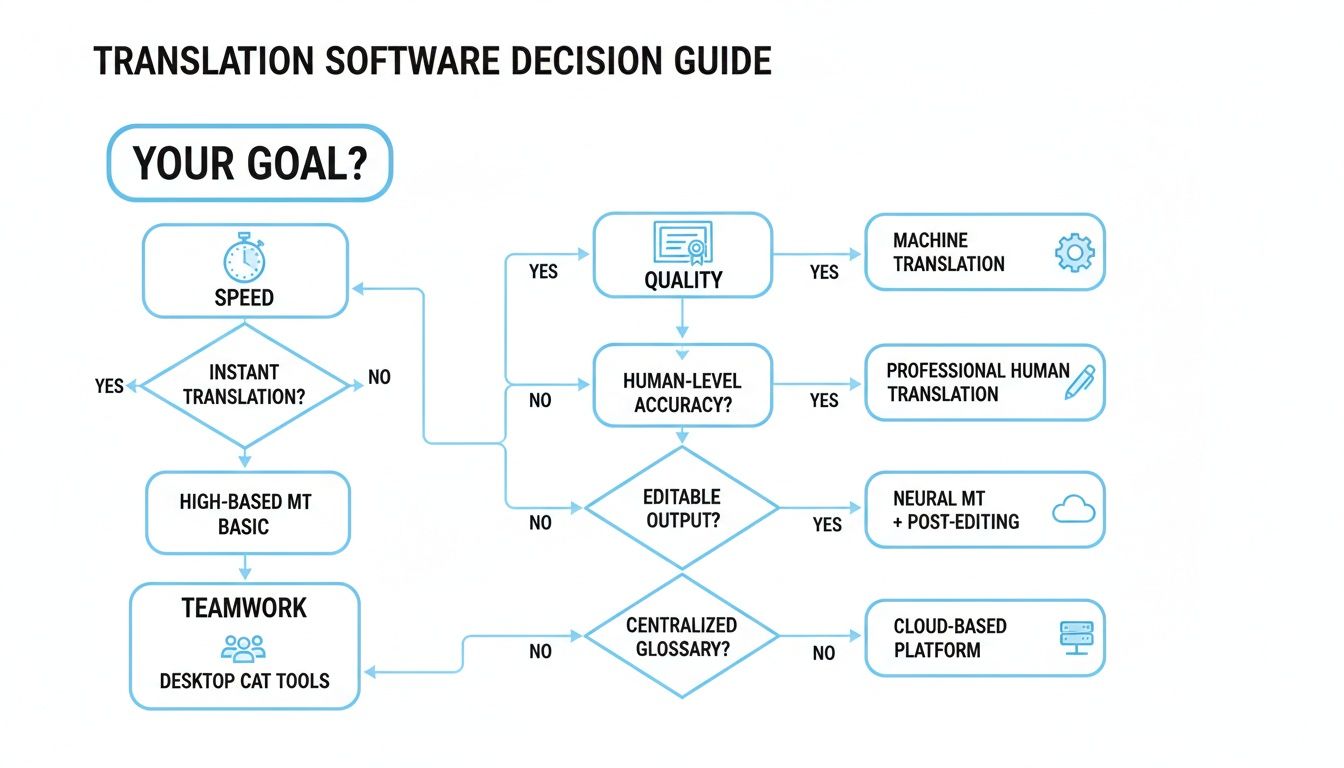
As you can see, what you’re trying to achieve should be your North Star. It directly shapes which features you should prioritize.
High-Fidelity Accuracy and Nuance
Let's be honest: a direct, word-for-word translation is rarely a good translation. Today's tools are judged on their ability to capture tone, style, and cultural subtext. This is where modern AI, especially Neural Machine Translation (NMT), has completely changed the game. Instead of translating word by word like older systems, NMT models look at entire sentences to grasp the context.
The result should be text that flows naturally, not something that sounds like a robot wrote it. For an author translating their novel or a marketer localizing a campaign, this is everything. The goal is to produce a translation that feels like it was written by a native speaker while honoring the original voice.
Flawless Layout and Formatting Preservation
What good is a perfectly translated document if the formatting is a complete wreck? Imagine a technical manual where all the diagrams are out of place or an e-book with jumbled chapters. A top-tier tool has to preserve the original layout with near-perfect precision.
This means keeping every little detail in its place:
- Structural Elements: Headings, chapters, and page breaks need to stay exactly where they were.
- Visuals and Tables: Images, charts, and tables shouldn't shift around or get distorted.
- Text Styling: All the little things that give a document its character—like bold text, italics, footnotes, and bullet points—must be carried over.
The gold standard is a translated file that is visually indistinguishable from the original. You shouldn't have to waste hours manually fixing layouts after the fact.
Broad File Format Support
Your work probably doesn't live exclusively in DOCX files. A truly useful tool needs to be a bit of a Swiss Army knife, capable of handling a wide range of formats without choking. When software can process different file types natively, it saves you the headache of file conversions, which often create formatting nightmares of their own.
Check for support for the formats you actually use, including:
- DOCX: The bread and butter for standard documents.
- PDF: Especially scanned PDFs that need Optical Character Recognition (OCR) to even become text.
- PPTX: For slide decks where layout is everything.
- XLSX: For spreadsheets where data integrity is critical.
- EPUB: The go-to format for e-books, which has its own complex structural rules.
Robust Security Protocols
When you upload your manuscript or a confidential business plan, you're placing a huge amount of trust in that software provider. Security isn't just a nice-to-have feature; it's a deal-breaker.
Look for a clear commitment to end-to-end encryption, which protects your files both on their way to the server and while they’re stored there. You'll also want to see a transparent privacy policy that states, in no uncertain terms, that your content is yours and won't be shared or used for anything else. Peace of mind is priceless.
How AI Is Changing the Game in Document Translation
Artificial intelligence has brought about the single biggest leap forward we've ever seen in translation technology. It’s the engine behind today's best software for translating documents, moving us far beyond the clunky, literal translations of the past and into an era of sophisticated, nuanced output that works for even the most complex projects.
The real star of the show is a technology called Neural Machine Translation (NMT). Don't think of it as a simple dictionary. Imagine instead an apprentice who has spent years studying billions of sentences in countless books and articles. Older systems would just swap words or phrases, often missing the forest for the trees. NMT, on the other hand, looks at the entire sentence to grasp its context, tone, and intent.
This deep contextual understanding is precisely why AI-powered translations sound so much more human. It’s the difference between a tool that just replaces words and one that can actually preserve an author's unique voice—something absolutely essential when you're translating a novel or finely crafted marketing copy.
The Real-World Impact of AI Translation
This isn't just theory; AI delivers tangible advantages that are making global communication easier and far more efficient for everyone. The market growth proves it, with the AI segment of the language industry expanding by an incredible 24.9% between 2023 and 2024. This boom is fueled by real-world results. You can dig into more numbers in the latest automated translation accuracy statistics on sonix.ai.
Here’s what that looks like in practice:
- Blazing Speed: AI can translate enormous documents—from a dense academic paper to a full-length book—in minutes, not months. This completely changes project timelines, helping authors and businesses connect with international audiences faster than ever before.
- Serious Cost Savings: By doing the heavy lifting upfront, AI makes high-quality translation affordable. This opens the door for independent authors, startups, and small businesses who once found professional translation completely out of reach.
- Rock-Solid Consistency: When you're dealing with technical manuals or legal contracts, you need key terms translated the same way every time. AI enforces this consistency flawlessly across hundreds of pages.
The true magic of AI is its ability to learn and adapt. It's not just following a set of pre-programmed rules. It's making intelligent choices based on the linguistic patterns it has analyzed, turning translation from a mechanical task into something closer to an art form.
Putting AI to Work for You
Using AI doesn't mean you have to cut the human expert out of the loop. In fact, the very best results come from a hybrid approach: let the AI create a high-quality first draft, and then have a human editor polish it to perfection. This blend of machine speed and human nuance is an incredibly powerful and efficient combination.
If you’re ready to start, a great first step is to learn how to automate translation workflows with AI tools. Getting this part right will make your entire process smoother. At the end of the day, AI-powered software makes quality document translation fast, affordable, and reliable, transforming a once daunting and expensive challenge into something anyone can tackle.
Solving the Unique Challenge of Translating E-Books
Translating an e-book isn't like running a simple document through a translation app. It's a whole different ballgame. While a DOCX or PDF file has its own formatting to worry about, an EPUB file is basically a mini-website zipped into a single file. It’s built with its own internal code, stylesheets, and navigation—all the stuff that lets a book's text reflow perfectly on any screen, from a small phone to a big e-reader.
Unfortunately, most generic software for translating documents just isn't built for that kind of complexity. These tools often treat an e-book as nothing more than a big block of text, completely ignoring the intricate digital architecture holding it together. The result? A mess. You often end up with a broken file, jumbled chapters, missing images, and a layout that’s fallen apart.
Preserving the Complete Reading Experience
A great e-book translation has to do more than just swap words from one language to another. It needs to protect the entire reading experience by keeping the original EPUB file's structure intact. A mangled file isn't just ugly; it might not even open on an e-reader at all.
Think about all the little things that make a book readable. Specialized software has to preserve every single one of them.
- Chapter Structure and Navigation: The table of contents has to work, with every link pointing to the right chapter.
- Stylistic Formatting: All those crucial details—like italics for emphasis, blockquotes for key passages, and custom fonts—must be carried over.
- Consistent Voice: Character dialogue and narrative tone need to feel the same from start to finish, which is a real struggle for generic AI.
- Embedded Media: Images, charts, and footnotes must stay exactly where they belong, anchored to the right piece of text.
For authors and publishers, this is a high-stakes problem. A poorly translated e-book can damage a brand and leave readers feeling frustrated. When your reputation is on the line, cutting corners on translation quality just isn't an option.
Why Specialized E-Book Tools Are Necessary
This is where dedicated e-book translation tools come in. Unlike the one-size-fits-all software, a tool built specifically for e-books knows how to read the underlying code of an EPUB file. It can translate the text while carefully protecting the structural tags that manage the layout, formatting, and navigation. This focused approach is the only way to ensure the final product is a clean, professional, and fully functional e-book.
If you're serious about taking your work to a global audience, choosing the right tool is everything. To get a better sense of what's out there, our guide on the top tools for both EPUB conversion and translation can help you weigh your options. At the end of the day, the goal is to find a solution that honors the author's original vision while creating an amazing experience for a new international readership.
Still Have Questions? Here Are Some Common Ones
Diving into the world of document translation can bring up a lot of questions. If you're weighing your options, getting straightforward answers to the most common concerns is the best way to move forward with confidence.
Can Software Really Capture an Author's Unique Voice?
It's a fair question, and the answer is yes—but with a big asterisk. It all comes down to the technology. Modern Neural Machine Translation (NMT) models have come a long way. The best ones, especially those built into specialized software for translating documents, have been trained on mountains of text.
This allows them to pick up on the subtle cues that define an author's style—their tone, their rhythm, their unique way of phrasing things. It's a world away from the clunky, literal translations of the past, making today's tools surprisingly good for even creative works like novels.
What's the Real Difference Between Free and Paid Tools?
Free tools are fine for getting the gist of a short email or a webpage, but for any serious work, the gap between free and paid is massive. It really boils down to four critical things:
- Accuracy: Paid software simply delivers a much higher quality translation with a better grasp of context.
- Security: This is a big one. Professional tools offer encryption and ironclad privacy policies. Free services? Not so much. Your data might be used to train their models.
- File Support: Paid tools are built to handle tricky formats like PDFs and EPUBs, keeping your formatting intact. Free tools often make a mess of them.
- Reliability: Try feeding a 100-page document into a free translator. It might crash or time out. Paid solutions are designed to handle that kind of workload without breaking a sweat.
When you choose a paid tool, you're not just paying for a better translation. You're investing in a secure, reliable, and professional-grade solution that protects your confidential information and preserves the integrity of your documents from start to finish.