
Ever wonder how massive books get translated so quickly while maintaining perfect consistency? It’s not magic, and it’s not purely a machine doing the work. The secret lies in a process called Computer-Assisted Translation, or CAT.
This isn't about replacing a skilled human translator with AI. Think of it more like a powerful partnership. CAT tools are sophisticated assistants that handle the repetitive, memory-based tasks, freeing up the human expert to focus on what they do best: capturing nuance, cultural context, and the subtle art of language.
Understanding Computer-Assisted Translation for PDFs

Imagine a master chef with a high-tech sous chef. The head chef is still the creative force, tasting, adjusting, and making every critical decision. But the sous chef flawlessly handles the tedious prep work—chopping, measuring, and remembering every recipe perfectly. That’s exactly how CAT works. It's a collaboration, not an automated factory line.
The software doesn't "think" for the translator or make creative choices. It just streamlines the workflow by taking care of the tasks that humans find exhausting but computers can do in a flash.
The Core Components of CAT Software
This human-and-machine team gets its power from two main features that are the bedrock of any serious translation project:
- Translation Memory (TM): This is a living database that saves everything a translator has ever worked on—every sentence, phrase, and paragraph. The next time a similar sentence pops up, the TM instantly suggests the previous translation. This saves an incredible amount of time and keeps the language consistent from chapter one to the appendix.
- Terminology Databases (Termbases): Think of a termbase as a custom glossary for your specific project. It’s a list of critical terms that must be translated the same way every single time. For a fantasy novel, this could include character names, magical spells, or fictional locations. It’s the tool that ensures consistency.
This powerful duo is a major reason for the industry's growth. The machine translation market, which is often integrated into CAT systems, was valued at USD 153.8 million back in 2020 and is on track to hit USD 230.67 million by 2026. Efficiency is the name of the game, especially when you’re dealing with the massive word counts of books.
The most important thing to remember is that CAT is about augmentation, not automation. It enhances human skill, freeing up translators to focus on the creative and cultural finessing that makes a translation truly great.
But here’s the catch when you throw a PDF into the mix. Before this amazing system can work, the software has to be able to read the document. A PDF is often like a picture of text; you can see the words, but you can’t easily grab them to work with.
This means there's a crucial first step before any translation magic can happen. The technology behind this, which allows machines to understand human language, is fascinating. If you’re curious about how it works, you can get a great overview by exploring Natural Language Processing (NLP).
The Unique Challenge of Translating PDF Files
So, why is translating a PDF so much harder than, say, a simple Word document? Here’s a good way to think about it: a PDF is like a photograph of a book page. You can see the words and images just fine, but you can't just click and edit them like you would in a normal text document. That fixed format is the heart of the problem.
This single issue throws a major wrench into any computer assisted translation PDF workflow. Before a CAT tool can even start doing its job with Translation Memory or glossaries, it needs clean, editable text. A PDF, by its very design, fights you on this every step of the way.
Digital-Native Versus Scanned PDFs
You'll generally run into two kinds of PDFs, and each brings its own flavor of difficulty to the table. Figuring out which type you're dealing with is the first step.
- Digital-Native PDFs: These are the files created directly from programs like Microsoft Word or Adobe InDesign. The text is technically there, but it's often locked into place. Trying to pull it out can feel like smashing a piggy bank—sure, you get the coins out, but you’re left with a mess of shattered formatting and broken paragraphs.
- Scanned PDFs: These are even tougher. A scanned PDF is essentially just an image, which means the "text" is nothing more than a pattern of pixels. To make it something a computer can understand, you have to run it through Optical Character Recognition (OCR), a process that scans the image and converts those pixels back into digital text.
A huge part of PDF translation is just wrestling with these scanned documents. Getting a handle on how to extract the text cleanly is a critical skill. To get a better sense of this complex process, it's worth learning how to translate scanned PDF files.
Common Pitfalls for Authors
Without the right tools and process, authors trying to translate a PDF often hit a wall of frustrating, time-sucking problems that tank the final quality of their book. For a deeper look at navigating these challenges, our guide on how to translate a scanned PDF is a great resource.
The fundamental problem with a PDF is that it was designed for viewing, not editing. Its whole purpose is to preserve a static visual layout on any device, which is the exact opposite of what a translation workflow needs: flexible, accessible content.
This basic conflict is what leads to all the classic headaches:
- Shattered Formatting: When you finally rip the text out, those clean columns and neatly organized paragraphs can turn into a chaotic jumble.
- Uneditable Graphics: Any text that's part of an image, like in a chart or diagram, stays locked away. It’s untranslatable without some serious image editing.
- Inaccurate Text Extraction: OCR is a powerful technology, but it isn't flawless. It can misread characters, introduce typos, or just fail completely on low-quality scans. This means someone has to painstakingly proofread the entire text before the translation can even begin.
These issues are precisely why a professional, tool-driven approach isn't just a nice-to-have; it's essential for getting a high-quality result.
Your Step-By-Step PDF Translation Workflow
Jumping into a computer assisted translation PDF project, especially for something as complex as a book, can feel overwhelming. But when you break it down into a clear, methodical workflow, the process becomes much more manageable. This roadmap will walk you through the entire journey, from that locked-down PDF to a perfectly translated, ready-to-publish book.
The real work starts long before the first word gets translated. The first, and arguably most important, phase is all about preparation. Think of it like laying the foundation for a house—if you don't get this part right, everything you build on top of it will be unstable. The goal here is to get your static PDF into a format that translation software can actually read.
Phase 1: Preparation and Text Extraction
Your first job is to pry the text free from the PDF's rigid structure. How you do this depends entirely on what kind of PDF you’re dealing with: one that was born digital or one that’s a scan of a physical document.
The path you take at the very beginning changes based on the PDF's origin.
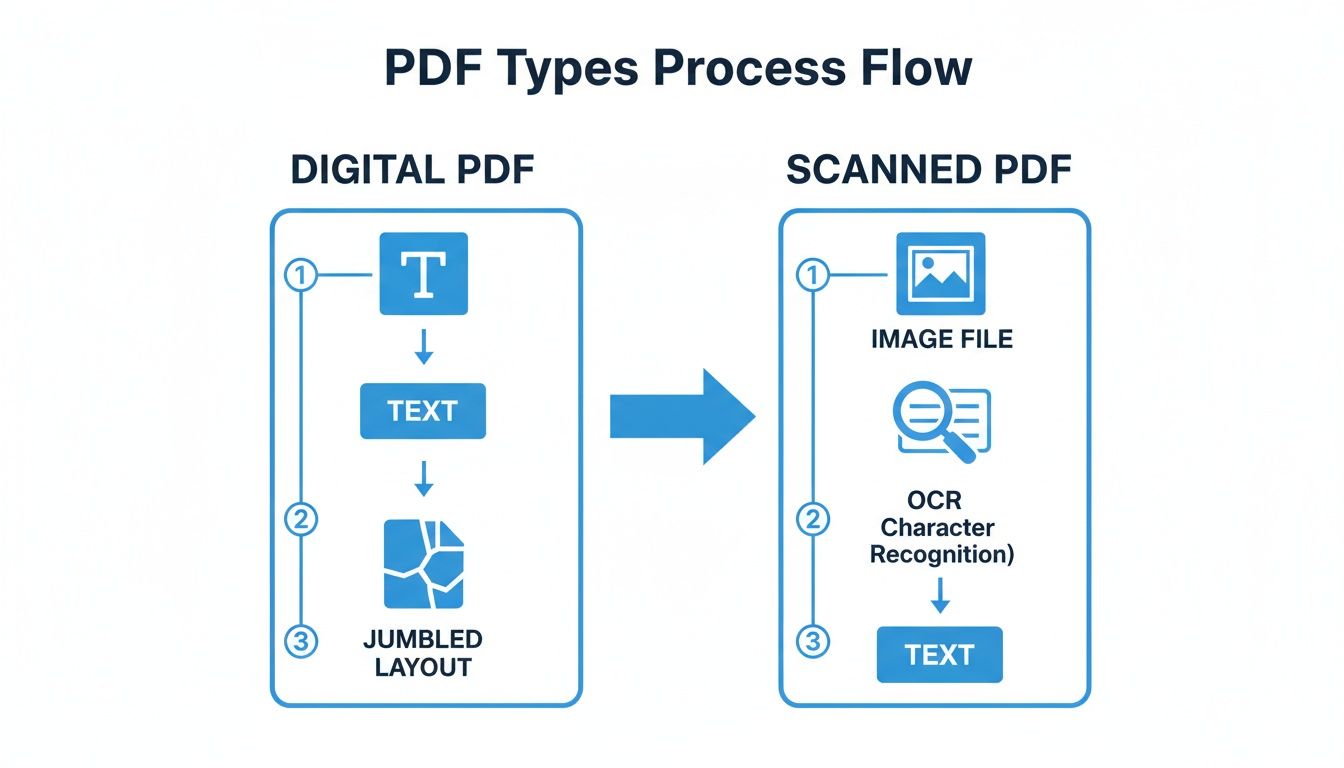
As you can see, both paths lead to extracted text, but the scanned PDF adds a tricky extra step: OCR.
For scanned books, this means running the pages through Optical Character Recognition (OCR) software. Be warned: this process is rarely flawless. It often spits out errors like misread letters ("l" instead of "1") or strangely merged words. That’s why a meticulous cleanup and proofread of the extracted text is absolutely essential before you do anything else.
To give you a clearer picture, here’s a breakdown of the entire workflow from start to finish.
CAT Workflow Stages for PDF Translation
This table outlines the essential stages in a computer-assisted translation workflow for a PDF file, showing what happens at each step and the tools involved.
| Stage | Objective | Common Tools or Techniques |
|---|---|---|
| 1. Text Extraction | Convert the PDF into an editable text format that a CAT tool can process. | Adobe Acrobat Pro, Abbyy FineReader (for OCR), various online converters. |
| 2. CAT Import | Import the clean text into a CAT environment and break it down into segments. | Trados Studio, MemoQ, Phrase, Smartling. |
| 3. Translation | Translate the text segment-by-segment, leveraging TM and Termbase assets. | Human linguist working within the CAT tool's editor. |
| 4. Quality Assurance | Run automated and manual checks to catch inconsistencies, errors, and formatting issues. | Built-in QA checkers in CAT tools (e.g., Xbench), manual proofreading. |
| 5. Layout (DTP) | Recreate the original book layout with the translated text and graphics. | Adobe InDesign, QuarkXPress, Affinity Publisher. |
Each of these stages builds on the last, ensuring the final translated book is accurate, consistent, and professionally formatted.
Phase 2: CAT Environment and Translation
With your clean, editable text ready to go, it's time to move into the CAT environment. This is where the magic happens, with powerful software features helping to ensure consistency and speed up the work.
- Import and Segmentation: You'll start by importing the text into your CAT tool. The software then automatically carves the text into smaller chunks called segments, which are usually sentences or phrases.
- Leveraging Assets: As the translator works through each segment, the tool actively suggests matches from the Translation Memory (TM). At the same time, the Termbase (your project glossary) flags key terms to ensure they are translated the same way every single time they appear.
- Human Translation and Review: This is where the human expert takes over. A professional translator will accept, reject, or tweak the software's suggestions, using their linguistic skills to capture the right tone, cultural nuances, and precise meaning. This step is what separates a high-quality translation from a clunky, machine-generated one.
The influence of AI in this space is impossible to ignore. The AI language translation market exploded from USD 1.88 billion in 2023 to USD 2.34 billion in 2024, a clear sign of the massive demand for these tools. It's changing how professionals work, too, with 70% of European language professionals now using machine translation as part of their daily workflow. You can learn more about the rise of AI in translation on sonix.ai.
The CAT environment is the heart of the workflow. It's where technology and human expertise merge, using stored knowledge (TM and glossaries) to build a consistent, high-quality translation layer by layer.
Phase 3: Quality Assurance and Final Layout
Once every sentence has been translated, the focus shifts to polishing and presentation. This is the home stretch.
First, you’ll run a series of automated Quality Assurance (QA) checks. These tools are designed to hunt down the kinds of mistakes a human eye can easily miss, like inconsistent terminology, number-formatting errors, or extra spaces. Think of it as a digital safety net.
Finally, the translated text is handed off for the Desktop Publishing (DTP) stage. Here, a professional designer opens up a program like Adobe InDesign and meticulously rebuilds your book's original layout. They re-insert images, format the new text to fit, and make sure the final translated book is a perfect visual match to the original. It’s a painstaking but absolutely critical final step.
Essential Tools for Computer Assisted PDF Translation
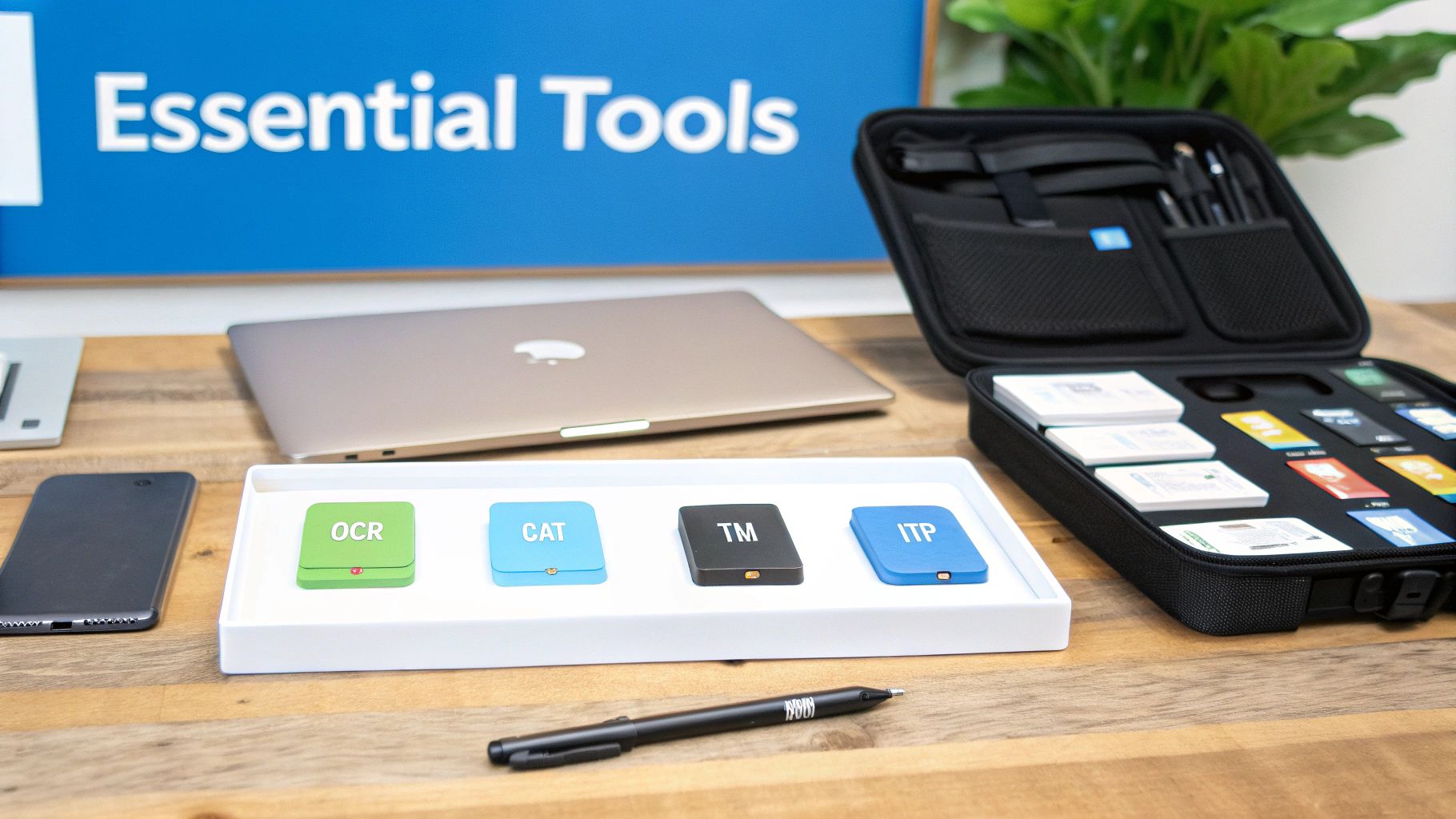
To successfully translate a PDF using computer-assisted methods, you need more than just one piece of software. It’s about assembling a specialized digital toolbox. Each tool has a very specific job: to carefully pull the text out of the PDF, help you translate it, and then put everything back together in a new language, making it look just like the original.
Think of it like a three-stage workshop for your book. First, you have to carefully disassemble the original. Second, you rebuild the core components—the words themselves—in the target language. Finally, you handle the final assembly and finishing touches. Every stage needs the right tool for the job.
Unlocking the Text with Converters and OCR
The very first step is often the trickiest. You need a way to unlock the text from the fixed, "flat" PDF format. For translating entire books, getting this initial stage right is absolutely critical.
Your main tools for this are:
- PDF Converters: If your PDF was originally created from a program like Word, a good converter like Adobe Acrobat Pro can often export it back into an editable format cleanly. This is always the best-case scenario.
- OCR Software: For scanned books or PDFs that are essentially just images of text, you need Optical Character Recognition (OCR). A powerful tool like ABBYY FineReader is designed to "read" the image of each page and convert the shapes of the letters back into actual, editable text.
Without one of these tools, your PDF is a locked box. They are the gatekeepers to your content, making it accessible for the translation tools that come next.
The Translation Engine: CAT Tools
Once the text is free, it moves to the heart of the operation: the CAT tool. This is where the translator's skill meets powerful software to produce an accurate and, most importantly, consistent translation.
Professional CAT tools like Trados Studio or memoQ are built around two features that are absolutely essential for book-length projects. Their whole purpose is to ensure consistency from page one to the final chapter.
Translation Memory (TM): Think of this as your project’s personal memory. It saves every sentence you translate. When that same sentence—or a very similar one—appears again, the TM instantly suggests the previous translation.
Terminology Management (Termbase): This is a custom glossary for your book. It ensures that key terms, like character names, places, or unique concepts, are always translated the exact same way every single time they appear.
This software is becoming central to global communication. The language translation software market, valued at USD 10.72 billion in 2024, is expected to grow to USD 18.26 billion by 2033, with document translation being its biggest piece. This growth just goes to show how vital these tools have become. You can read more about these market trends on researchnester.com.
Rebuilding the Visuals with DTP Software
After the translation is finished, you're left with a block of plain text. The final, critical step is to get that text back into the book's original layout, complete with images and professional formatting. This is the job of Desktop Publishing (DTP) software.
Industry-standard programs like Adobe InDesign are used for this phase. A skilled designer takes the translated text and meticulously places it back into the layout, re-inserts images, adjusts spacing to account for text expansion, and ensures the finished book is a perfect mirror of the original. This is a hands-on process that requires a designer's eye, not an automated step. Our guide to document translation software dives deeper into these kinds of tools.
Best Practices for Translating Your PDF Book
Getting a book translation right, especially when you're starting with a PDF, is all about strategy. If you dive in without a plan, you can easily end up with a frustrating, expensive mess. But by following a few proven best practices, you can navigate the process smoothly and get a result that does your original work justice.
The first, and by far most important, rule is this: always seek out the original source file first. Before you even think about tackling the PDF, do everything you can to find the file it was created from, whether that’s an Adobe InDesign project, a Microsoft Word document, or something similar. This one step can save you a world of hurt, bypassing the tricky and time-consuming process of extracting text and rebuilding the layout from scratch.
Assess Your Starting Point
Okay, so you’ve tried everything and the PDF is all you have. Now what? Your next move is to figure out exactly what kind of PDF you're dealing with. A clean, digitally-created PDF is a completely different beast than a blurry, scanned one.
A quick way to test this is to open the document and try to highlight the text with your cursor. If you can select individual words and sentences, you're in good shape. This means the text is "live" and can likely be extracted cleanly.
If you can't select anything, you've got an image-based PDF on your hands, which means you're headed for the OCR step. The success of that process hinges entirely on the quality of the scan.
- Check for clarity and resolution: Are the letters crisp and sharp, or do they look a bit fuzzy? High-resolution scans give OCR software a much better chance of getting things right.
- Look for complex layouts: Be on the lookout for tricky formatting. Things like multiple columns, text that wraps around images, and lots of tables can easily confuse extraction tools.
- Identify handwritten notes: OCR technology is notoriously bad at reading handwriting. Any scribbled notes or marks will almost certainly need to be transcribed manually.
Prepare for Consistency and Plan for Design
Before a single word gets translated, you need to think about consistency. This is where a glossary, or termbase, comes in. This is simply a list of your book's key terms—think character names, unique concepts, or branded phrases—along with their pre-approved translations. Handing this to your translator is crucial for maintaining consistency across all 400+ pages, which is one of the biggest tells of a professional job.
A common pitfall is thinking the job is done once the translation is finished. In reality, that’s only half the battle. Rebuilding the book's design and layout is a separate, and often equally intensive, task.
Finally, don't forget to budget time and resources for what’s known as Desktop Publishing (DTP). Languages rarely take up the same amount of space. A translation from English to German, for instance, can often be up to 30% longer. A professional designer will need to go back in, adjust the layout to fit the new text, re-insert all the graphics, and make sure the final book looks just as polished as the original. Planning for DTP from day one saves you from nasty surprises down the road and ensures your translated book is something you can be proud of.
Why EPUB Is the Smarter Choice for Book Translation
After wrestling with the tricky, often frustrating world of computer assisted translation PDF workflows, it becomes pretty obvious there has to be a better way. And thankfully, there is. The solution is to start with an EPUB file right from the beginning, which sidesteps nearly all the painful manual steps we just covered.
Think of it like this: a PDF is basically a digital photograph of a page. The text is flattened into the image, making it a real headache to extract or change. An EPUB, on the other hand, is more like a dynamic Word document. It's built to be flexible, allowing text and images to reflow and adapt to any screen—or any language.
This built-in adaptability is a massive win for authors and translators. When you use an EPUB, you can forget about clunky text extraction or messy OCR conversions. The entire structure of your book—every chapter, every heading—is already perfectly preserved.
The Structural Advantage of EPUB
The magic of the EPUB format lies in how it holds onto your book's blueprint. It understands what a chapter is, what a heading is, and what's just a regular paragraph. This built-in organization means that when it's time to translate, the process is far cleaner and more accurate.
- Chapters and Headings: All your chapter breaks and heading levels (H1, H2, etc.) stay exactly where they belong. The translated book will have the same logical flow as your original.
- Styles and Formatting: Critical formatting like italics, bold text, and blockquotes are all carried over. None of your stylistic emphasis gets lost in translation.
- Seamless Integration: This clean, predictable structure allows translation tools like BookTranslator.ai to ingest the file instantly. The result? A translation that's dramatically faster and far more affordable than anything you could achieve with a PDF.
By choosing EPUB from the start, you're not just picking a different file type; you're choosing a path of less resistance. You can dive deeper into this topic by comparing EPUB vs. PDF for AI translation.
Common Questions About Translating PDF Books
When you're looking to translate a PDF book, a few key questions almost always come up. Getting these answers right from the start can save you a world of frustration, keep your budget in check, and ensure the final product looks as professional as the original. Let's dig into the most common ones.
Are Free Online PDF Translators a Good Idea for a Book?
It’s definitely tempting to use a free online tool, but for a book, this is almost always a bad move. These tools are notorious for completely wrecking the original layout, turning your beautifully designed pages into a jumbled mess.
Even more critical is the privacy risk. When you upload your manuscript to a free service, you're essentially handing over your intellectual property. You lose control over who sees it and how it's used.
Why Can't I Just Copy and Paste the Text Out of the PDF?
If you've ever tried this, you know the pain. Copying and pasting text directly from a PDF is a recipe for chaos. You'll get weird line breaks in the middle of sentences, words smashed together, and paragraphs that are completely broken.
The result is a messy, unworkable source text that needs hours of manual cleanup before you can even think about putting it into a CAT tool. It creates more work than it saves.
The heart of the problem is that PDFs were built to be digital printouts—they prioritize looking good over being easy to edit. Their internal structure is all about visual placement, not logical content flow, which is why a simple copy-paste operation fails so spectacularly.
What's the Real Cost of Professional PDF Translation?
The price tag for translating a PDF book really breaks down into two main parts. First, there's the actual translation, which is usually priced on a per-word basis.
The second part, and the one that often surprises people, is the Desktop Publishing (DTP). This is the design work required to take the new, translated text and meticulously recreate the book's original layout. This is a separate, skilled task that can sometimes cost just as much as the translation itself, especially for visually complex books.
Ready to bypass the headaches of PDF translation? With BookTranslator.ai, you can upload your book in the EPUB format and get a professional-quality, AI-powered translation in over 50 languages that preserves your original layout and formatting. Start translating your book today!