
Let's break down what the Open Document Format (ODF) really is. At its core, ODF is an open-source file format designed for everyday office documents—things like text files, spreadsheets, and presentations. Think of it as a universal key that unlocks your documents in any compatible software, freeing you from being tied to one company's products.
A Universal Language for Your Documents
Imagine you wrote a brilliant novel, but you used a special ink that can only be read with a specific, expensive pair of glasses. What happens if that company goes out of business or decides to change the ink? Your novel becomes unreadable. This is the exact problem proprietary file formats create, and it's what ODF was designed to solve.
Instead of a secret code, ODF acts like a universally understood language.
It’s an open standard, which means the technical blueprints are public. Anyone can build software that reads and writes ODF files without paying a license fee or asking for permission. This simple but powerful idea ensures your work truly belongs to you, accessible on your terms, today and decades from now.
Getting to Know the ODF Family
While ODF is the name of the standard, you’ll usually see its specific file extensions. They're easy to remember because each one corresponds to a common document type, serving as a direct open-source alternative to the proprietary formats many of us are used to.
Here’s a quick rundown of the main players you’ll encounter.
A Quick Guide to Common ODF File Types
| ODF Extension | Document Type | Equivalent Microsoft Format |
|---|---|---|
| .odt | OpenDocument Text | .docx (Word) |
| .ods | OpenDocument Spreadsheet | .xlsx (Excel) |
| .odp | OpenDocument Presentation | .pptx (PowerPoint) |
These three—.odt, .ods, and .odp—are the workhorses of the ODF world. Using them means your content isn't trapped inside a single program.
This principle of open access is so important that many governments and archival institutions now require ODF for long-term document storage. It's a smart move. They're betting on the standard, not on a single company. This approach aligns with best practices outlined in any good guide to technical documentation formats, where longevity and accessibility are paramount.
The real magic of ODF is future-proofing. By choosing an open standard, you're not gambling on one company’s future. You're investing in a format built from the ground up for stability and universal access.
For authors and publishers, this choice has real-world consequences, impacting everything from translation workflows to ebook distribution. For instance, when prepping a book for digital release, you need to weigh your options carefully. We take a closer look at this in our analysis of EPUB vs PDF, but the underlying principle is the same: the right format ensures your work remains readable and accessible for years to come.
The Story Behind ODF’s Push for Open Standards
The Open Document Format wasn't just another file type that appeared out of nowhere; it was born from a movement. Its origin story is all about digital freedom and a direct challenge to the frustrating problem of vendor lock-in—a situation where documents created in one company's software couldn't be reliably opened or edited in another.
For a long time, the digital world was siloed. Closed, proprietary systems basically held users' data hostage. Imagine pouring your heart into writing a book, only to find the publisher has locked it in a vault and they have the only key. That was the reality for millions of people using formats like Microsoft's old binary .doc files, which were notoriously complex and opaque. If you ever wanted to switch to a different word processor, you were rolling the dice, risking lost formatting, garbled data, or not being able to open your own files at all.

The Call for a Universal Standard
This widespread frustration sparked a major collaborative effort to build a truly open alternative. The mission was clear: create a file format based on XML (Extensible Markup Language), a foundation that’s both human-readable and completely transparent. The idea was to let any developer build software that could perfectly read, write, and understand a document’s structure without needing a secret decoder ring from a single tech giant.
The movement really started picking up steam in the late 1990s and early 2000s. The seeds were planted around 1999 when Sun Microsystems acquired StarOffice and saw the potential in its XML-based format. This initiative was eventually taken up by the Organization for the Advancement of Structured Information Standards (OASIS), a global consortium focused on creating open standards. After years of hard work, ODF was officially approved as an OASIS standard on May 1, 2005, a huge win for interoperability. You can learn more about this journey and the two decades of the Open Document Format here.
This wasn't just a technical achievement; it was a philosophical one.
ODF represented a fundamental shift in control. It moved power away from a single corporation and placed it into the hands of a global community, ensuring that digital information could remain accessible to everyone, forever.
From Consortium to Global Recognition
The final piece of the puzzle was getting ODF recognized as an official international standard. This crucial milestone was hit when it became ISO/IEC 26300. This endorsement from the International Organization for Standardization meant ODF wasn't just some scrappy alternative; it was a robust, reliable, and globally accepted format ready for serious work.
Because of this open and standardized nature, ODF quickly became the format of choice for organizations that care deeply about long-term data preservation. We're talking about:
- Governments: They need to ensure public records stay accessible to citizens for decades, regardless of how technology changes.
- Libraries and Archives: Their whole purpose is preserving our digital heritage, and they can't rely on proprietary software that might disappear one day.
- Educational Institutions: Many promote the use of free and open-source tools, giving students and researchers access without financial barriers.
Ultimately, the story of ODF is the story of a community that chose collaboration over control. They built a digital foundation that ensures our documents can outlive the very software we use to create them.
What’s Really Inside an ODF File?
From the outside, an ODF file—whether it’s an ODT, ODS, or ODP—seems like a single, self-contained document. But that’s just on the surface. If you could crack it open, you’d discover it's actually a sophisticated package, a bit like a zip archive holding a whole team of files and folders that work in concert.
This packaged structure is one of the most brilliant aspects of the Open Document Format. By keeping content, styling, and metadata in separate compartments, ODF builds in stability. It makes data recovery much easier if a file ever gets damaged and ensures different programs can read and display your document the way you intended.
Think of it this way: ODF is like building with LEGOs, not carving a statue from a single block of marble. Each brick has a specific role and fits together in a predictable, standardized way.
The Core Components of an ODF Package
You can actually peek inside yourself. Just take an ODF file, change its extension to .zip, and open it with any standard archive tool. What you'll find is a collection of files, most of them written in XML (Extensible Markup Language). XML is perfect for this job because it uses simple, text-based tags to describe data, making it easy for both computers and humans to understand.
Inside, you'll find a few key players doing specific jobs:
- content.xml: This is the heart and soul of your document. It contains all the raw text you wrote, the numbers in your spreadsheet, or the bullet points on your slides.
- styles.xml: This file is the interior designer. It holds all the formatting rules—font choices, text colors, paragraph spacing, table borders, you name it.
- meta.xml: Think of this as the document's ID card. It stores metadata like the author’s name, the date it was created, the total word count, and other vital statistics.
- settings.xml: This one remembers your personal preferences for the document, like the last cursor position or the zoom level you were using.
This separation of duties is incredibly smart. It means you can completely overhaul a document's appearance by modifying styles.xml without ever touching the actual words in content.xml. This modular design is also a massive help when converting files. For example, knowing how tables are defined in content.xml is critical for proper EPUB table formatting when you’re translating a book or converting it to an ebook.
By separating content from presentation, the ODF file format creates a robust and flexible structure. This modular approach is a key reason why ODF is so reliable for long-term archiving and cross-platform compatibility.
How ODF Became a Global Standard
The ODF structure we see today didn't just appear overnight. It was carefully refined over years by a dedicated global community to maximize its power and compatibility. The journey kicked off with discussions at a Danish Unix User Group meeting way back in 2001, which led to formal development at OASIS starting in late 2002.
ODF 1.0 was approved as an OASIS standard in May 2005. Later versions, like ODF 1.2 and 1.3, introduced important new features for digital signatures and accessibility, eventually becoming ratified as the global standard ISO/IEC 26300. You can explore the detailed history of this standardization to see the full timeline. This ongoing evolution is what ensures the ODF format remains a trustworthy and future-proof choice.
Comparing ODF with Microsoft’s Office Open XML
When you dive into the world of document formats, the conversation inevitably turns to the big rivalry: ODF (Open Document Format) versus Microsoft's Office Open XML (OOXML). Even if you don't know the OOXML name, you definitely know its work—it's the technology behind the .docx, .xlsx, and .pptx files you see every day.
While both are technically open, XML-based standards, their backstories and design philosophies couldn't be more different. This isn't just academic trivia; these differences have real-world consequences for how your documents look and behave across different applications.
Imagine two blueprints for a house. ODF is like a blueprint created by an independent standards committee, designed to be simple, logical, and easy for any builder in the world to follow perfectly. OOXML, on the other hand, is like a blueprint reverse-engineered from a sprawling, feature-rich mansion that was already built (Microsoft Office), designed to document every existing quirk and custom feature.
When you run into an ODF file, the path forward is usually pretty clear, as this flowchart shows.
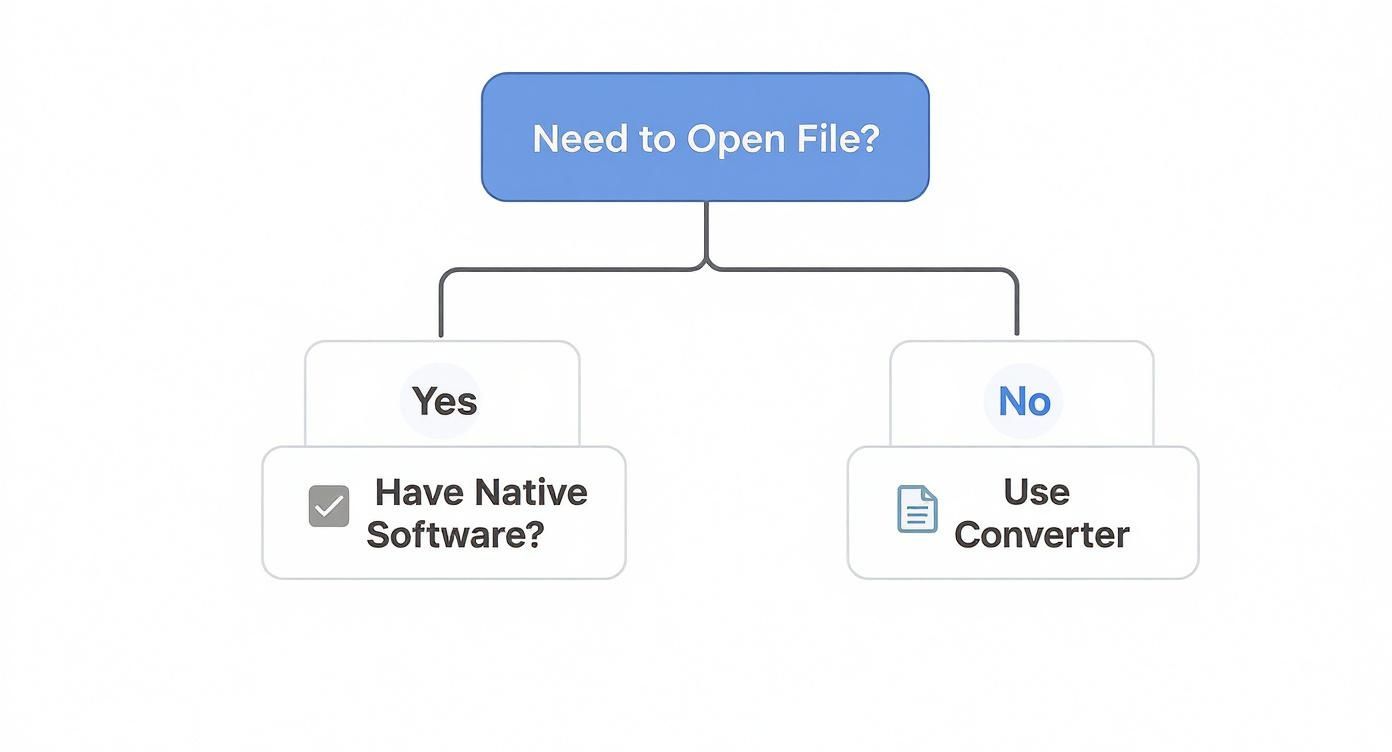
You either open it with software that supports it directly, or you use one of the many converters available. It’s designed to be straightforward.
Two Standards, Two Philosophies
The fundamental split comes down to how they were created. ODF was a ground-up effort from a vendor-neutral consortium (OASIS) with a clear mission: create one truly open, interoperable format that wasn't tied to any single company's products. Simplicity and consistency were the goals.
OOXML's journey was different. Microsoft developed it to accurately represent every feature and function that had been built into its Office suite over decades. It’s also an approved open standard, but its specification is massively complex. This complexity can be a real hurdle for other developers trying to build software that can read and write OOXML files with 100% accuracy, which is why a .docx file can sometimes look slightly "off" when opened in Google Docs or LibreOffice.
ODF is built for universal compatibility and long-term access, making it a favorite for governments, libraries, and archives. OOXML is built for perfect fidelity within the Microsoft software ecosystem, offering maximum convenience for teams who live and breathe Microsoft Office.
To make the differences crystal clear, let's put them side-by-side.
ODF vs OOXML: A Head-to-Head Comparison
This table breaks down the core differences in philosophy and practical application between the two dominant document format standards.
| Feature | Open Document Format (ODF) | Office Open XML (OOXML) |
|---|---|---|
| Origin | Developed by a vendor-neutral committee (OASIS). | Developed by Microsoft, later standardized. |
| Design Goal | Simplicity, interoperability, and long-term preservation. | To represent all features of Microsoft Office. |
| Complexity | Relatively simple and concise specification. | Extremely large and complex specification. |
| Primary Use Case | Governments, archives, open-source software users. | Corporate environments using Microsoft Office. |
| Common Suffixes | .odt, .ods, .odp |
.docx, .xlsx, .pptx |
| Ecosystem | Supported by a wide range of software, including open source. | Best supported within the Microsoft Office suite. |
Understanding these distinctions helps explain why you might run into compatibility issues and guides you toward making the right choice for your own projects.
Practical Implications for You
So what does this all mean for your day-to-day work? The "best" format really just depends on who you're working with and what you're trying to accomplish. It’s a classic trade-off: do you prioritize open accessibility or seamless integration with a specific ecosystem?
Here are a few things to think about:
- Collaboration: If your entire team is on Microsoft 365, sticking with OOXML formats (
.docx,.xlsx) is often the path of least resistance. You’ll avoid hiccups with advanced features like track changes, complex charts, or embedded macros. - Long-Term Access: For documents that need to be accessible a decade from now—think legal contracts, academic papers, or official government records—ODF is the safer bet. Its simpler, fully documented DNA means future software will have no trouble reading it, no matter what happens to any one company.
- Software Freedom: If your team uses a mix of everything—LibreOffice, Google Docs, and Microsoft Office—ODF often provides more reliable results across the board. Its vendor-neutral design helps minimize those frustrating formatting surprises when a file moves between applications.
In the end, there’s no single winner. Each format has its strengths. ODF is the champion of open standards and future-proofing, while OOXML remains the native tongue of the world's most popular office software. Knowing the difference empowers you to choose the right tool for the job.
How to Open, Edit, and Convert ODF Files
So you've got an ODF file—what now? Don't worry, working with them is simple once you know the right tools. Whether you're opening a document from a colleague, tweaking a spreadsheet, or converting a file so everyone can open it, you have plenty of great options, and many of them are completely free.
The trick is picking the right application for the task. Some programs handle the ODF format more gracefully than others, so let’s walk through the best software for opening, editing, and converting your ODF documents.
Top Software for Handling ODF Files
Your experience with an ODF file really comes down to the software you're using. For the smoothest ride, a native ODF editor is your best bet, but the big proprietary suites also offer decent—if not always perfect—support.
Here are the most common and reliable choices:
- LibreOffice: Think of this as the gold standard for ODF. It's a free, open-source office suite, and since ODF is its native format, you get 100% compatibility. Your
.odt,.ods, and.odpfiles will look exactly as intended, with zero formatting glitches. - Google Docs, Sheets, and Slides: Google’s cloud-based apps handle ODF files with ease. Just upload the file to your Google Drive, and it will open right up in the correct application, ready for you to edit.
- Microsoft Office (Word, Excel, PowerPoint): Modern versions of Microsoft Office can open, edit, and save files in the ODF format. While compatibility has gotten much better over the years, you might still see minor differences in complex layouts or special features compared to how they appear in a native ODF program.
For mission-critical documents where the formatting has to be perfect, always use a native ODF application like LibreOffice. It completely removes the risk of those small but frustrating conversion errors that can pop up when bouncing files between different software ecosystems.
Step-by-Step Guide to Converting ODF Files
Sometimes, you just need to switch formats. You might want a PDF to send a final, uneditable version of a report, or a DOCX to collaborate with someone who exclusively uses Microsoft Word. Thankfully, the conversion process is built right into most modern office suites.
Let's use LibreOffice Writer as an example to convert an .odt file to .docx:
- Open Your File: Fire up LibreOffice Writer and open the
.odtdocument you want to convert. - Navigate to Export or Save As: Head up to the "File" menu. You’ll see options for both "Save As" and "Export."
- Choose Your Desired Format: In the dialog box that appears, click the dropdown menu for the file type. Scroll through the list and select "Word 2007-365 (.docx)".
- Save the New File: Give your converted file a new name if you'd like, then click "Save." That's it! Your document is now a fully compatible DOCX file.
This same logic applies to converting files to other formats, like PDF. This kind of flexibility is a huge help for authors preparing manuscripts for various platforms. For instance, after finalizing a book in ODF, they often need to convert it before publication. This is a common step before using more specialized software, and you can learn more by checking out the top tools for book processing.
By mastering these simple steps, you can confidently manage ODF files in any situation. You get all the benefits of working in an open format while still collaborating smoothly with anyone, no matter what software they prefer.
Answering Your Questions About ODF
Even after you get the basics down, you'll probably still have a few practical questions about using the Open Document Format day-to-day. Let's dig into some of the most common ones that pop up, so you can feel completely comfortable working with ODF files.
Is ODF Actually Better Than DOCX?
This is the big one, isn't it? The honest answer is that one isn't universally "better" than the other. It really boils down to what you need to accomplish. Think of it like choosing a vehicle: sometimes you need a rugged, all-terrain truck, and other times you need a sleek city car.
You'll find ODF is the clear winner for:
- Future-Proofing Your Work: Because ODF is an open, straightforward standard, you can be confident your files will still be perfectly readable in 10, 20, or even 50 years.
- Maximum Compatibility: It plays nicely with a huge range of software, not just the big names. From LibreOffice to Google Docs, you'll find solid support.
- Freedom from Vendor Lock-In: You're never stuck with one company's software or forced into a subscription just to access your own work.
Now, if you and everyone you collaborate with live and breathe inside the Microsoft Office suite, then sticking with DOCX can often be the path of least resistance. For documents that rely heavily on Word-specific macros or complex formatting features, staying native to that environment will save you from potential compatibility hiccups.
Can Microsoft Office Open ODF Files Without a Hitch?
Yes, modern versions of Microsoft Office can open and save files like .odt and .ods. But is the process perfect? That's a strong word. For a simple document—just text, a few headings, maybe a bolded word here and there—it’s usually a smooth ride.
The trouble can start when you move more complex files between these different software worlds.
Think of it like translating a poem. You can get the literal meaning across, but some of the nuance might get lost. Complex page layouts, detailed tracked changes, or sophisticated spreadsheet formulas can sometimes get scrambled in the conversion. While Microsoft’s support for ODF has gotten much better, the only way to guarantee 100% fidelity is to use a program built for ODF from the ground up, like LibreOffice.
Are ODF Files Secure?
On their own, ODF files are very secure. The format itself doesn't have any built-in security flaws. Just like any other file on your computer, the real risk comes from where you got it and what program you use to open it. The ODF standard fully supports modern security tools like password protection and digital signatures, giving you the power to lock down and authenticate your documents.
One of the biggest security perks of ODF is its open, XML-based foundation. Because it's not a secret, black-box format, security researchers all over the world can inspect it for weaknesses. This kind of public scrutiny is much harder with proprietary formats. The old rule of thumb still applies, of course: always be wary of opening any file from a source you don't know or trust.
Ready to make your books accessible to a global audience? BookTranslator.ai offers professional-quality AI translation that preserves your original formatting and voice. Translate your work into over 50 languages with just one click at https://booktranslator.ai.