
Let's be honest, the easiest way to translate a page is usually built right into your browser. A quick click on an icon in the address bar often does the trick. But for moments when you need a bit more control, you can always copy the text directly into the Google Translate website or install a dedicated browser extension.
Why Knowing How to Translate a Page is No Longer Optional
In a world this connected, language shouldn't be a roadblock. Think about it: you could be a student digging into international research, a professional trying to stay ahead of global market trends, or just someone curious about a culture on the other side of the planet. Being able to translate a page on the fly is a crucial skill.
This isn't just a "nice-to-have" anymore; it's a fundamental part of navigating the web. The demand for breaking down language barriers is exploding. The global language services market was already valued at a staggering USD 60.68 billion in 2022 and is on track to hit USD 96.21 billion by 2032. If you're curious about the numbers, you can dig into the full market analysis from Redokun.com.
We’re going to skip the generic advice and get straight into what works in the real world. This guide will walk you through the best methods out there, from the simple one-click browser tools to specialized AI platforms built for more complex documents.
It's More Than Just Reading a Blog Post
Translating a quick article is one thing, but the need for this skill runs much deeper. I see it all the time in different fields.
Consider these common scenarios:
- Academic Research: Students and academics constantly bump into papers, studies, and historical texts published in languages they don't speak.
- Global Business: To stay competitive, you need to read international market reports, check out competitor websites, and follow industry news from all over.
- Cultural Exploration: Sometimes you just want to read a book, a news story, or a piece of creative writing from another culture without waiting for an official translation to come out.
The ability to pull in and understand data from anywhere is what separates the good from the great.

This kind of global data visualization is becoming the norm. Being able to interpret it, regardless of the source language, is what gives you the complete picture. Each translation method we'll cover strikes a different balance between speed, accuracy, and convenience, so you can pick the right tool for whatever you're trying to accomplish.
How to Translate a Page with Browser Tools and Extensions
Sometimes you just need a quick, on-the-fly translation, and the best tools for that are often the ones you already have. Modern browsers like Chrome, Safari, and Firefox have surprisingly powerful translation features baked right in, making them your first line of defense when you hit a language barrier online.
This flowchart gives a great visual of the different reasons you might need a fast translation, whether for work, research, or just plain curiosity.
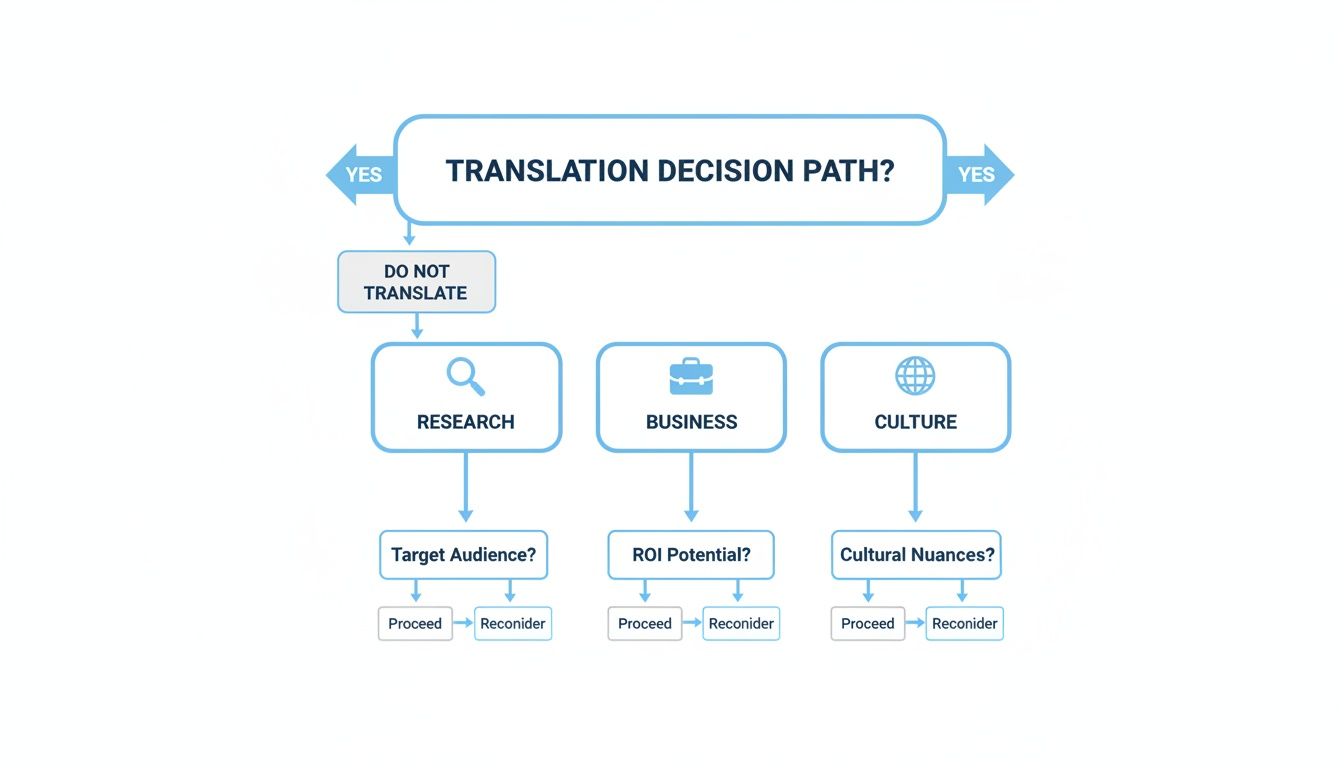
As you can see, most of these scenarios—like grabbing business intel or exploring another culture's news—prioritize speed and convenience over perfect accuracy.
Using Your Browser’s Native Translator
Ever landed on a page in another language and seen a little icon pop up in the address bar? That's your browser's built-in translator kicking in.
In Google Chrome, a Google Translate icon appears, and with one click, you can translate the entire page into your default language. It’s that simple. Safari and Firefox have similar one-click functions. These tools are perfect for getting the general idea of an article, checking out an international e-commerce site, or just satisfying your curiosity.
The real beauty of built-in browser tools is how seamless they are. You don't have to install anything or copy-paste text into another tab. It's a frictionless way to get an immediate understanding of the content right where you are.
But let's be realistic—they aren't perfect. Built-in translators can sometimes stumble over complex sentences, idiomatic expressions, or specialized industry terms, leaving you with a translation that's a bit clunky or even inaccurate. For a look at how another popular browser handles this, check out our guide on how to translate pages in Opera.
Leveling Up with Browser Extensions
If you find yourself needing more accuracy or features than the native tools offer, browser extensions are the way to go. These add-ons integrate directly into your browser but often pack a much bigger punch.
A few standout options include:
- DeepL Translate: Many people swear by DeepL for its impressively natural and nuanced translations. It has a knack for catching subtle meanings that other machine translators often miss.
- Google Translate Extension: While it uses the same engine as Chrome's built-in feature, the extension gives you more control. You can easily translate just a snippet of text by highlighting it, which is incredibly useful.
- Reverso: This one is a game-changer if you're trying to learn a language. It not only translates but also shows you words and phrases in context, pulling example sentences from all over the web.
There are a ton of fantastic free Chrome extensions out there that can seriously boost your productivity, translation tools included.
The biggest plus of using an extension is having a choice. You can pick the tool that best fits your needs—whether that’s DeepL’s high-fidelity output or Reverso’s contextual learning. The only minor downside is the initial setup, but for the boost in quality, it’s a tiny price to pay.
Comparing Instant Translation Methods
To help you decide at a glance, here's a quick comparison of the most common free tools for translating web pages.
| Method | Best For | Key Advantage | Potential Drawback |
|---|---|---|---|
| Built-in Browser Translator | Casual browsing & quick understanding | Zero setup, completely seamless | Lower accuracy with complex text |
| Browser Extension | Frequent translation & better accuracy | More features and choice of engines | Requires one-time installation |
| Google Translate Website | Translating text snippets or documents | Supports file uploads and text input | Requires switching tabs & copy-pasting |
| Manual Copy-Paste | Translating small, specific phrases | Works with any online translator | Inefficient and time-consuming |
Each of these methods has its place. The key is to match the tool to the task—a quick browse doesn't need the same precision as in-depth research.
Handling Complex Documents Like Ebooks and PDFs
Translating a simple webpage is one thing. But what happens when you’re staring down a 300-page ebook, a dense technical manual, or a PDF with carefully crafted layouts? This is where the usual suspects—browser tools and copy-paste methods—fall apart.
They often spit out a wall of text, stripping away chapter breaks, mangling tables, and completely losing the formatting that makes the document readable in the first place. The result is a mess.
For these kinds of long-form, complex documents, you need to bring in a specialist. You need a tool built not just to swap words, but to understand and preserve the entire structure of the original work.
A Smarter AI Solution for Authors and Publishers
This is exactly why platforms like BookTranslator.ai exist. They were created to tackle the specific headaches that come with translating books and other major documents. Instead of seeing a massive block of text, this kind of AI recognizes the building blocks of a publication—chapters, headings, footnotes, and even stylistic choices like italics.
This type of intelligent translation is more important than ever. The global books market is valued at a staggering USD 136.23 billion in 2024 and is expected to climb to USD 202.24 billion by 2032. As the market expands online, authors and publishers have a massive opportunity to reach new international audiences, but only if the translation is seamless. You can read more about this growing market on Fortune Business Insights.
The key difference here is intelligence. A specialized tool doesn't just see words; it sees structure. It understands that a heading isn't just bold text—it's the start of a new section. Preserving that structure is everything for readability.
Think about it. A novel with no chapter breaks is unreadable. A user manual with jumbled steps is useless. For anyone producing professional content, maintaining the document's integrity is non-negotiable.
The Practical Workflow for Translating Ebooks
Using a dedicated platform makes the entire process incredibly straightforward, giving you a high-quality result without needing a degree in publishing technology.
Here’s what it generally looks like in practice:
- Upload Your Document: First, you upload your file. Most services are built for standard ebook formats like EPUB, but many can also handle PDFs and other common types.
- Pick Your Languages: You simply choose the document's original language and the target language you need.
- Select Translation Quality: Many platforms offer different tiers. A "Basic" option might use a solid AI model for general reading, while a "Pro" plan will use a more advanced, nuanced AI perfect for professional publications.
- Translate and Download: The AI gets to work, processing the entire book while keeping the formatting intact. When it’s done, you get a fully translated file, ready to go.
This approach lets you manage all of your translation projects from one clean dashboard, making it easy to track different books and language versions.
Why Formatting Preservation Is a Game Changer
The single biggest win of using a tool built for books is its ability to maintain the original layout. When you translate a page from a complex document, you're not just translating words; you're also dealing with images, tables, and layouts that give the content its meaning. If you're tackling scanned documents, our guide on how to translate a scanned PDF dives deeper into that specific challenge.
Here’s a quick comparison to put things in perspective:
| Feature | Standard Translators (e.g., Google Translate) | Specialized AI (e.g., BookTranslator.ai) |
|---|---|---|
| Formatting | Almost always lost; you get a plain block of text. | Preserved; chapters, headings, and styles stay put. |
| File Types | Limited to copy-paste or very basic uploads. | Optimized for EPUB, PDF, and other book formats. |
| Context | Translates sentence by sentence, often missing nuance. | Analyzes larger chunks of text for better context. |
| Output | Raw text that requires hours of reformatting. | A ready-to-read, fully formatted ebook file. |
Ultimately, for anyone serious about translating long-form content—from a self-publishing author trying to reach a global audience to a student accessing international research—a specialized tool is the only practical way to ensure the final product is both accurate and professionally presented.
Practical Tips for Improving Translation Quality
Getting a basic translation is one thing; getting a great one takes a bit more finesse. While today's automated tools are incredibly powerful, they're not perfect. The real magic happens when you shift from just accepting the output to actively refining it. This small step can make a world of difference in ensuring your message is clear, accurate, and feels natural.
I like to think of machine translation as a very capable assistant. It does about 90% of the heavy lifting, but that final 10% is where human oversight is irreplaceable. This is where you catch the awkward phrasing, fix idioms that don't make sense, and check for cultural relevance. It's especially important when you're translating a page for a real audience, not just for your own quick understanding.
A simple trick I often use is to cross-reference key sentences. If a phrase sounds a little off or its meaning is absolutely critical, I'll copy and paste it into a different tool, like DeepL or Reverso. If both tools spit out a similar translation, I feel much more confident that it's on the right track.
Go Beyond Literal Translation
This is where true quality comes into play. The gap between a direct, word-for-word translation and genuine localization is huge. A literal conversion often falls flat because it completely misses the cultural context. Idioms are the perfect example—translating "it's raining cats and dogs" literally into Spanish or German will just get you strange looks.
Localization is all about adapting the content so it feels native to the people reading it. This goes way beyond just swapping out words.
- Cultural References: A pop culture joke that lands in the United States might be totally meaningless in Japan.
- Units of Measurement: Switching miles to kilometers or Fahrenheit to Celsius makes the content instantly more relatable.
- Dates and Currencies: You’d be surprised how much confusion a simple MM/DD/YYYY format can cause in a country that uses DD/MM/YYYY.
Localization isn’t just about changing the language; it’s about making sure the message connects. The goal is for the reader to feel like the content was created just for them.
Spot and Correct Awkward Phrasing
Once you have the initial translation, give it a thorough read-through. Ask yourself, "Does this sound like something a real person would say?" AI can sometimes produce sentences that are grammatically correct but feel stiff or unnatural. Be on the lookout for repetitive sentence structures or overly formal language when a casual tone is what you're after.
For anyone tackling this on a bigger scale, like an entire website, understanding how to manage these details within your content management system is a game-changer. This is where learning about customizing multilingual features can be incredibly valuable for keeping your quality high and your messaging consistent.
Ultimately, by applying these practical checks, you can elevate a basic machine translation into something polished and professional. The key is to treat the AI output as a solid first draft—one that you review, refine, and localize—to get top-notch results every time you translate a page.
Solving Common Page Translation Problems
Even with today's impressive tools, translating a page can be surprisingly glitchy. You hit the translate button expecting a clear result, but instead, you get a confusing mess—or worse, nothing happens at all. These digital hiccups are definitely frustrating, but the good news is they usually have a simple fix.
Think of this as your go-to troubleshooting guide. We'll walk through the most common translation headaches, from stubborn bits of text that refuse to change languages to formatting that gets completely mangled.
Why Parts of a Page Might Not Translate
It’s a classic problem: you translate a page, and most of it looks great, but the headers, menus, or certain blocks of text are still in the original language. When this happens, it’s almost always for a technical reason happening behind the scenes.
Often, the text you're trying to translate isn't actually text at all—it's part of an image. Standard translation tools can't read words embedded in a picture. The other common culprit is complex code, like JavaScript, which can sometimes load content in a way that the translation engine just doesn't see.
Before you get too frustrated, try these quick fixes:
- Hit refresh: I know it sounds too simple, but you'd be surprised how often a quick page reload gives the translator the kick it needs to re-scan everything.
- Clear your cache: Your browser holds onto old data to load sites faster, but this can sometimes interfere with translation scripts. Clearing the cache forces a clean slate.
- Double-check your settings: Make sure your browser's preferred language is set correctly and that you haven't accidentally told it to "never translate" the site's language in the past.
Fixing Jumbled Formatting and Layouts
Have you ever copied text from a nicely formatted webpage or PDF into a translator, only to get back a giant, unreadable wall of text? This is an incredibly common issue. The translation tool grabs the words but completely ignores the structure—the headings, paragraphs, and lists all disappear.
The result is a mess that’s practically useless. The translator just isn't built to understand the visual layout; it only sees a string of characters.
When formatting is crucial—like in an e-book, a technical manual, or a business report—the copy-paste method is guaranteed to fail. You need a tool that’s smart enough to understand and preserve the document's original structure.
This is exactly why format-aware tools like BookTranslator.ai exist. It’s specifically designed to recognize chapters, headings, bold text, and other styling elements, keeping the translated document's layout intact. This can save you hours of manual reformatting. If you're curious about the technology behind this, you can learn more about how AI detects translation errors and maintains document integrity.
Choosing the right tool for the job isn't just a convenience; it's the only way to avoid these frustrating formatting problems from the start.
Got Questions? We've Got Answers
When you start translating content, a few common questions always seem to pop up. Let's tackle some of the ones I hear most often to clear up any confusion and help you pick the best translation method for your needs.
Is AI Translation Good Enough for Professional Projects?
This is the big one. For professional work—think publishing a book or localizing critical business documents—today's AI translators can give you an incredibly solid starting point. The best models, especially those you get with a Pro plan, can catch nuance and tone with surprising skill, often hitting over 95% of what a human translator can do for major language pairs.
That said, for anything truly important, you should always have a native speaker give it a final look. That human touch is what catches subtle cultural idioms and makes the text feel completely natural to the reader. But for your own reading or general research? AI is more than up to the task.
Think of AI as your super-efficient assistant. It handles the heavy lifting, freeing up a human editor to focus on the fine-tuning that makes a translation truly shine.
How Do I Translate Text from an Image or a Scanned PDF?
You've probably run into this problem: your go-to translation tool can't read text that's locked inside an image. If you've got a scanned document, a screenshot, or a graphic with words, you’ll need a two-step process.
First, you need to pull the text out of the image using something with Optical Character Recognition (OCR). A tool like Google Lens is fantastic for this on your phone, and apps like Adobe Scan are also great options. The OCR software essentially "reads" the image and turns the words into text you can actually copy.
From there, it's easy. Just paste that text into your favorite translator, like Google Translate or DeepL, and you're all set. This extract-then-translate workflow is the most reliable way to handle text that isn't in a standard format.
What’s the Real Difference Between Translation and Localization?
It’s easy to use these terms interchangeably, but they mean very different things.
Translation is the straightforward process of converting words from one language to another. It answers the question, "What does this literally say?"
Localization, however, is a much bigger and more thoughtful process. It’s about adapting the entire experience to feel native to a specific region. It goes way beyond just words and considers things like:
- Measurements: Switching from miles to kilometers.
- Formats: Adjusting dates from MM/DD/YYYY to DD/MM/YYYY.
- Culture: Swapping out idioms, slang, or pop culture references that wouldn't make sense.
- Visuals: Changing images or color schemes to be culturally appropriate.
So, while translation changes the language, localization ensures the message actually lands and feels right to the people reading it.
Ready to translate your ebooks and complex documents with professional precision? BookTranslator.ai preserves your original formatting and delivers high-quality, nuanced translations in over 50 languages. Try it today and bring your stories to a global audience.