
In a world that’s more connected than ever, a solid web translator for Safari isn't just a nice-to-have feature; it's a must. It's the key to breaking down language barriers on the fly, whether you're digging into foreign academic research, shopping on international sites, or just catching up on global news. The right tool makes the web feel truly worldwide.
Why a Great Safari Web Translator Is a Game-Changer
We’ve all been there—landing on a webpage in a language we don't speak. In the past, this meant a tedious cycle of copying text, jumping over to a separate translation app, and then trying to stitch the meaning back together. Thankfully, those days are over. Modern integrated tools offer instant, seamless language conversion right inside your browser.
With around 1 billion users worldwide, Safari is a huge portal to the internet. That massive user base makes a reliable translation feature absolutely critical. In the Americas alone, Safari commands a 36.86% market share, which means millions of people rely on it every single day for work, school, and fun. You can dig into more of these numbers at MyCodelessWebsite.com. This context really drives home just how vital good translation tools are.
Real-World Scenarios Where Translation Makes All the Difference
Think about the practical side of this. An e-commerce owner can keep tabs on competitor websites in Japan or Germany, all without ever leaving Safari. A student working on a history project can access primary source documents from a French university's digital archive in seconds.
Here are just a few everyday situations where a powerful translator is a lifesaver:
- Planning International Travel: Suddenly, booking hotels, reading local restaurant reviews, and figuring out train schedules in another language is a breeze.
- Global Business Intelligence: You can stay on top of international industry news, analyze foreign market trends, and actually understand what your overseas partners' websites are saying.
- Academic and Personal Research: A whole world of information opens up, from dense scientific papers to cultural blogs that would otherwise be out of reach.
The shift toward AI for these kinds of tasks is undeniable. Many people now prefer the instant results from AI over waiting for official, human-powered translations. You can read more about this growing trend here: https://booktranslator.ai/blog/95-perfect-why-readers-are-choosing-ai-over-waiting-for-official-translations.
The real benefit here is empowerment. An integrated translator gives you the freedom to explore the web without being stopped by language, opening up a world of new perspectives and knowledge.
Ultimately, having the right translation tool just makes your entire browsing experience better. While Safari's built-in feature is a great start, other dedicated services often pack more power, like the tools highlighted on Polychat's translator page. Whether you stick with the native option or grab a specialized extension, a reliable solution is your ticket to a more open web. This guide will show you how to get it all set up.
Squeezing Every Last Drop Out of Safari's Built-in Translator
Before you even think about hitting the App Store for a third-party web translator for Safari, it's worth getting to know the tool Apple already baked right in. Safari's native translation is a surprisingly handy feature, built directly into the browser on macOS, iOS, and iPadOS. It offers a clean, quick way to understand foreign content without any extra downloads.
Getting it to work is usually pretty simple. When you land on a webpage that isn't in your system's default language, Safari is smart enough to detect it on its own most of the time.
How to Actually Use the Translate Button
On a Mac, you'll see a small translate icon pop up in the Smart Search field—that's the address bar at the top of the browser. If you're on an iPhone or iPad, just tap the 'aA' icon in the address bar. A menu will drop down with the option "Translate to [Your Language]."
This is what it looks like in action on a Mac. The option is right there waiting for you.
Once you click it, the magic happens. The feature translates the page you're looking at, and if you click a link to another page on the same website, it often keeps the translation active. This is perfect for browsing an international news site or figuring out a product description on an e-commerce store based in another country.
But let's be honest, the tool has its moments. While it’s designed for on-the-fly use, many people run into frustrating inconsistencies. It’s not uncommon, especially after updates like macOS Sequoia 15.6.1, for the translation button to play hide-and-seek, appearing randomly or not at all. You can dive deeper into how browsers stack up over on ExpressVPN's blog.
Knowing Its Limits and When It’s Time to Give Up
The biggest drawback of the built-in translator is that it's a manual, one-page-at-a-time affair. It doesn't give you that seamless, automatic translation across all websites that dedicated extensions are known for. If your browsing habits take you across a wide range of international content, having to click "translate" on every new site gets old fast.
You'll also run into situations where the translate button just vanishes. A few things could be happening here:
- Mixed-Language Pages: If a webpage has chunks of text in different languages, it can throw off Safari’s detection algorithm.
- Sloppy Website Code: Sometimes a site's code doesn't properly declare its language in the HTML, leaving Safari guessing.
- Simple Glitches: Don't underestimate the power of a good old-fashioned page reload or clearing your browser cache. Often, that's all it takes to bring the button back.
The bottom line is this: Safari’s built-in translator is fantastic for casual, one-off situations. It’s the perfect tool when you just need the gist of an article or a quick look at a foreign site without installing something new.
But if you find yourself needing more languages, wanting translations to happen automatically everywhere, or looking for more advanced features, you've officially outgrown what Apple's native tool can do. Knowing its limitations is key—it helps you pinpoint the exact moment you need to start looking for a more powerful third-party extension to fill in the gaps.
Going Beyond the Basics: Supercharging Safari with Translator Extensions
So, you've tried Safari's built-in translator and found it... a bit lacking. If the native tool feels more like a speed bump than a helpful feature, it's time to look at what translator extensions can do. Think of these as powerful add-ons from the App Store that pick up right where Safari's tool leaves off, offering a much more capable and dependable experience for anyone who regularly browses the international web.
Safari's on-demand, single-page approach just doesn't cut it for heavy use, and that's created a perfect opening for developers to step in. This gap is why extensions like Smartcat's Safari Web Translator have gained traction. They often use sophisticated AI to automate translations, which, for businesses, can slash costs by up to 90% and speed things up by 50%. Considering that 76% of people prefer to shop and browse in their own language, the need for better tools is undeniable. For a deeper dive into these browser trends, ExpressVPN's blog has some great insights.
Not sure if you need to make the switch? This little decision tree sums it up perfectly.
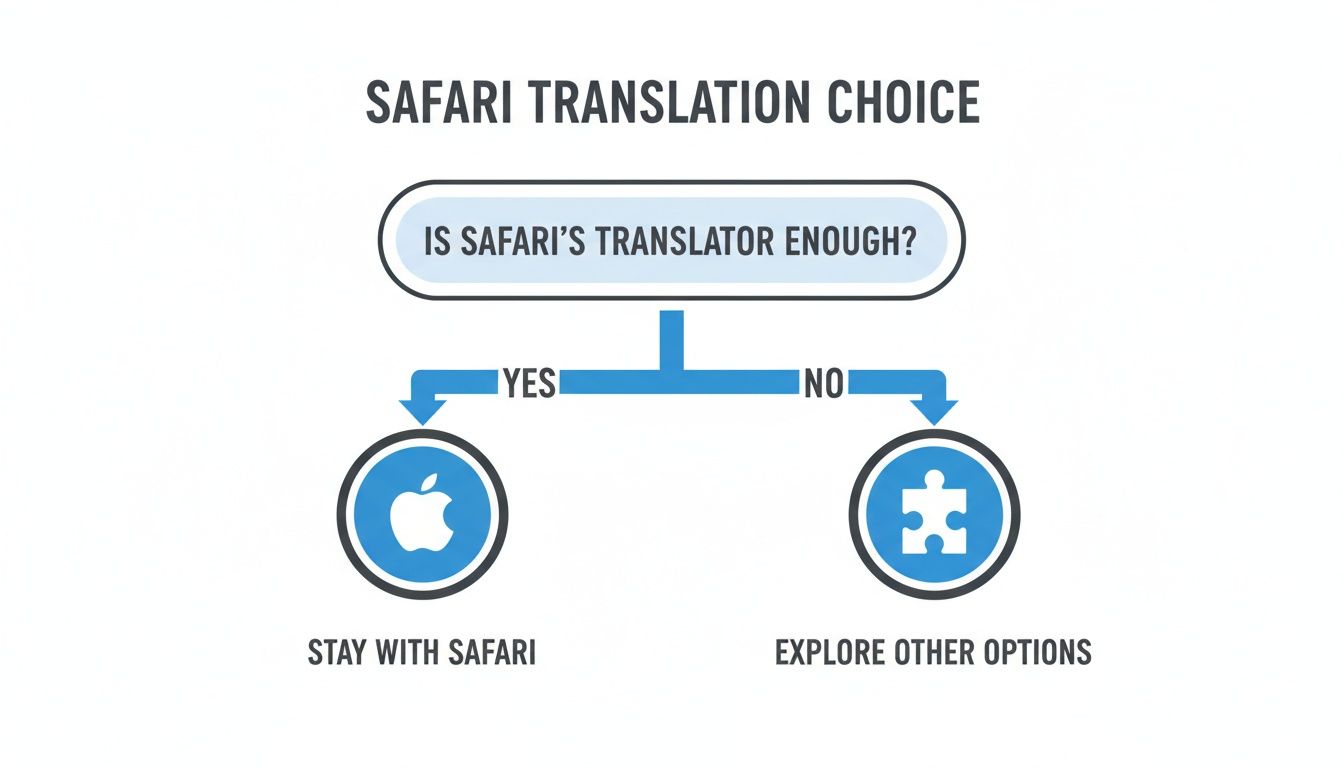
It’s pretty clear: if you only need a quick translation once in a blue moon, Safari’s built-in feature is fine. For anything more, an extension is the way to go.
Choosing the Right Translator Extension
A quick trip to the Mac App Store reveals a bunch of options, each with its own perks. The most immediate upgrade you'll notice is language support. While Safari's tool has a fairly short list, many extensions blow it out of the water by supporting over 100 languages. That alone is a game-changer if you need to read content from less-common regions.
Here's what the best extensions typically bring to the table:
- Automatic Full-Page Translation: This is the big one. You tell the extension your preferred language once, and it just works. Pages translate instantly as you browse, no extra clicks needed.
- Side-by-Side View: Some of the really good ones can show you the original text and the translation at the same time. This is fantastic for language learners or anyone who needs to double-check the accuracy of a tricky phrase.
- Smarter Controls: Top-tier extensions let you create a "never translate" list for certain websites or languages, giving you much finer control over your browsing.
The real win with an extension is that you shift from a reactive to a proactive translation workflow. It starts anticipating what you need, making the web feel genuinely borderless instead of a series of frustrating, manual tasks.
Let's quickly compare the two approaches. The table below breaks down what you get with Safari's default tool versus what a good third-party extension can offer.
Comparing Safari Translation Methods
| Feature | Safari Built-In Translator | Top Third-Party Extensions |
|---|---|---|
| Activation | Manual, click-by-click per page | Automatic and instant upon page load |
| Language Support | Limited (currently 17 languages) | Extensive (often 100+ languages) |
| Customization | Very basic language preferences | "Never translate" lists, advanced settings |
| Advanced Features | None | Side-by-side view, text-to-speech, etc. |
| Consistency | Can be hit-or-miss across pages | Generally more reliable and consistent |
| Best For | Occasional, casual translation needs | Frequent, multi-language browsing |
As you can see, for anyone who needs more power and control, an extension is a clear step up.
How This Works in the Real World
Picture this: you're an e-commerce manager who needs to keep an eye on competitor pricing across Europe and Asia. Using Safari's built-in tool, you'd be stuck clicking the translate button on every single product page, over and over. It would be maddening.
A good extension completely changes the game. You could browse sites in French, Japanese, and German, and the content would just appear in English, seamlessly. It turns a clunky, time-sucking research task into a smooth, natural part of your day.
Ultimately, the choice comes down to how you balance quick convenience with the need for deeper context. We actually wrote about this very trade-off in our guide on context-aware translation tools. If your work, research, or hobbies depend on accessing global information, spending a few minutes to install and set up a quality extension will pay for itself almost immediately.
Keeping Your Translations Private: What You Need to Know

Let’s be honest: using any web translator for Safari means you’re sending a webpage’s content to some service to be processed. This naturally brings up privacy concerns. Knowing exactly how your data is being handled is the key to browsing foreign sites without that nagging feeling in the back of your mind, especially when sensitive information is involved.
The good news? Apple’s built-in translation feature is designed with privacy at its core. It heavily favors on-device processing, meaning the translation happens right on your Mac or iPhone. This is a huge win for privacy because the page content doesn't have to leave your device.
Third-party extensions, however, usually play by different rules. Most of them rely on their own servers to do the heavy lifting. The text from the webpage gets sent to their servers, translated by their AI, and then sent back to you. This approach often allows for more languages and fancier features, but it also means your data takes an extra trip off your device.
How to Vet a Translator Extension's Privacy Policy
Before you click "Install" on any new extension, it pays to do a quick background check right there in the App Store. A developer who respects your privacy will be upfront about how they handle your data.
Here’s a quick checklist I run through:
- Read the Privacy Policy: I know, it's not exciting, but a reputable developer will have a clear, easy-to-find policy. I usually just skim it to see what data they collect, how long they keep it, and if they share it with anyone else. Red flags are vague language or no policy at all.
- Check the Permissions: When you install an extension, Safari shows you what it wants to access. A translator needs permission to "read and alter webpages" to work. But if it's asking for a whole lot more, that's a reason to pause and question why.
- Look at Reviews and Ratings: User comments are gold. I always look for what people are saying about privacy and security. A solid history of positive feedback from a developer with a real website is always a good sign.
If you're looking for more general tips, this guide on How to Protect Privacy Online offers some great broader strategies for keeping your data safe.
Here's my rule of thumb: Assume that anything you translate with a server-based extension is being read by that company. If a page has your financial details, medical records, or login credentials, I’d strongly recommend skipping the third-party translator entirely.
The Hidden Cost of "Free"
Lots of fantastic extensions are free, which inevitably makes you wonder, "What's the catch?" It's a fair question. Running the powerful servers needed for translation costs developers real money.
Some cover these costs with unobtrusive ads or by offering a paid premium version with extra features. The less ideal scenario is that they might be collecting and selling anonymized browsing data. It's worth digging into https://booktranslator.ai/blog/there-is-no-such-thing-as-free-the-hard-truth-about-translation-apis-in-2024 to understand the economics at play.
In the end, spending just a few minutes vetting an extension can save you a lot of worry down the road. This way, you can get all the benefits of these incredible tools without putting your digital privacy at risk.
Pro Tips for More Accurate and Natural Translations
Even the very best web translator for Safari is going to hit a wall sometimes. AI translation is an incredible leap forward, but let's be honest—it’s not a native speaker. The messy, colorful, and often illogical parts of human language, like slang, idioms, and inside jokes, are where these tools often stumble. The result can be a translation that's technically correct but feels completely off or misses the meaning entirely.
Think about an idiom like "it's raining cats and dogs." A machine might translate that literally, leaving someone reading in Spanish completely baffled. This is where you, the human, come in. With a few smart strategies, you can guide the tool toward much more natural and reliable results.
Think Small and Isolate Key Phrases
When a translated sentence just feels clunky or makes zero sense, don't settle for the full-page translation. Instead, try highlighting and copying just that specific phrase or sentence. Popping that smaller snippet into the translator often produces a much clearer result, since the AI can focus without the muddying context of the entire paragraph.
Another trick I use all the time is cross-referencing with a second translation tool. If Safari's built-in feature or an extension gives you a weird translation for something important—say, a critical product spec or a meeting detail—paste the original text into another service. Getting a second opinion can instantly reveal an error or provide the missing context.
My personal rule is this: If the information is important enough that a misunderstanding would cause a real problem, I always get a second opinion from another translator. It takes five seconds and has saved me from embarrassing mistakes more than once.
Master Advanced Features for Consistency
For anyone using translation for work, consistency is non-negotiable. If you're in a field with its own jargon, like law, medicine, or engineering, a generic translation can be a real headache. You’ll see key terms translated one way on one page and completely differently on the next.
This is where the more powerful translator extensions really shine. The best ones let you create a custom glossary.
- Define Your Terms: You can build a personal dictionary of industry-specific terms and command the translator to always use your preferred translation.
- Ensure Brand Consistency: Add your company or product names to the glossary to make sure they're never mangled by the AI.
- Improve Accuracy Over Time: This glossary becomes a permanent guide for the translator, making every future translation on that subject smarter and more reliable.
Building a glossary is like giving your translator a cheat sheet tailored to your exact needs. It’s the single best way to move beyond basic comprehension and get truly professional-grade results right inside your browser.
Got Questions About Safari Translation? We've Got Answers
Even the most straightforward tools can leave you scratching your head sometimes. When it comes to using a web translator for Safari, a few common questions and hiccups tend to pop up again and again. Let's tackle them head-on so you can get back to seamless browsing.
This is your quick guide to solving those little annoyances and making better choices about the tools you use.
Why Did the Translation Option Vanish?
This is probably the number one frustration I hear about. You’re on a foreign-language site, you expect to see the translation icon, but... poof. It's gone. What gives?
Often, the page itself is the culprit. If it has a mix of different languages, Safari's detection can get confused and won't offer to translate. Another common issue is that the website’s code simply doesn't declare what language it’s written in, leaving Safari in the dark. Don't discount the simple stuff, either—sometimes a quick page refresh is all it takes to kick it into gear. I’ve also seen certain macOS updates cause temporary bugs with the feature, so that's something to keep in mind.
Are Translator Extensions from the App Store Safe to Use?
For the most part, yes. Anything available on the official Mac App Store has to pass Apple's review process, which gives you a decent layer of security.
That said, a little healthy skepticism is always a good idea. Before you hit that "Install" button, do your own quick background check:
- Read the reviews: What are other people saying? Look for recurring complaints.
- Check the developer: Do they have a professional website and a history of other well-regarded apps?
- Scan the privacy policy: How will they handle your data? Look for specifics.
A trustworthy developer is transparent about their data practices. If you can't find a clear privacy policy, or if it's full of confusing legal jargon, that's a big red flag.
Can I Really Trust a Web Translator for Professional Work?
For getting the gist of an article, doing some initial research, or just browsing casually, these AI-powered translators are amazing tools. They're fast and give you a solid overview of the content.
However, if you're dealing with a business contract, a legal document, or a technical manual, absolute precision is critical. Machine translation often misses subtle cultural nuances and context that can completely change the meaning. For any high-stakes work, think of the AI translation as a first draft. You should always have the final version checked by a professional human translator.
What if Safari Doesn't Support the Language I Need?
Apple's built-in translator is great, but its language list is still fairly limited. If you regularly work with languages that aren't on the official list, a third-party extension is going to be your best friend.
Many of the top extensions on the App Store support well over 100 languages, vastly expanding your reach. They plug right into your browser and give you the flexibility to translate almost any content you come across, making them a must-have for anyone dealing with a wide range of global sources.
For translating entire books with professional-grade accuracy while preserving their original layout, BookTranslator.ai offers a powerful solution. Upload your EPUB and get a perfect translation in over 50 languages, with no subscriptions required. Discover more at booktranslator.ai.