
EPUB Translation with Cloud-Based AI
Translating EPUB files is now faster, cheaper, and easier than ever. With cloud-based AI tools like BookTranslator.ai, you can translate an entire book in minutes for under $10 - compared to the $1,000–$10,000 cost of traditional human translation. Plus, it preserves the book's formatting, making it ready for e-readers without extra work.
Here’s what you need to know:
- Cost: $5.99–$9.99 per 100,000 words, far less than human translation ($0.12–$0.25 per word).
- Speed: Minutes or hours to translate a book versus weeks or months with human translators.
- Accuracy: About 95% for most language pairs, with features like glossaries for consistency.
- Ease of Use: Upload your EPUB, select your language, and download a fully formatted, translated file.
- For Authors and Readers: Test new markets quickly or access foreign titles previously unavailable in English.
To get started, validate your EPUB file, ensure metadata is U.S.-friendly, and upload it to BookTranslator.ai for a seamless translation experience. This tool makes global publishing more accessible than ever.
How to translate ebooks (epub)?
Preparing Your EPUB for Translation
Before uploading your EPUB to BookTranslator.ai, it's worth taking a few moments to conduct some quick checks. This can help you avoid formatting headaches later on. Most translation issues come from problems like corrupted files, DRM restrictions, or messy metadata, all of which can lead to hours of frustrating reformatting.
Validating and Cleaning Your EPUB File
The first step is to run your EPUB file through EPUBCheck, a widely used validation tool. As the DAISY Consortium explains, "EPUBcheck is the open source tool for validating digital publications in EPUB format" [3]. This tool examines your file's container structure, packaging, metadata, and internal references to ensure everything is in order. Whether you prefer a command line interface (CLI) or a graphical user interface (GUI), both versions are free and effective at catching technical errors that could disrupt the translation process.
However, keep in mind that EPUBCheck only flags technical issues [3]. You'll still need to manually review the file for other problems, like typos or misplaced images. If your EPUB file is protected by DRM restrictions - a common situation for files purchased from retailers like Amazon - you’ll have to remove those protections first. Translation tools, including BookTranslator.ai, can’t work with DRM-protected files.
Once your file passes these checks, turn your attention to language compatibility and content structure.
Language and Content Setup
For multilingual or non-standard scripts, use an EPUB Language Compatibility Checker. This tool can help identify potential issues with Right-to-Left (RTL) languages like Arabic or Hebrew, as well as ensure font support for non-Latin scripts [1]. If your content includes mixed-language sections, such as English text interspersed with French dialogue, flag these areas for special handling during translation. For RTL languages, make sure language tags are set correctly - this determines how the text flows after translation.
Setting Up Metadata for U.S. Readers
Metadata plays a huge role in making your book discoverable on platforms like Amazon KDP, Apple Books, and Barnes & Noble Press. Use specific and descriptive keywords, such as "epic fantasy with dragons", to help your book appear in relevant searches [4]. Proper metadata also ensures a seamless post-translation experience and helps attract the right audience.
When preparing metadata for a U.S. audience, follow American conventions. Use dates in the MM/DD/YYYY format, price your book with a dollar sign (e.g., $5.99 instead of $5,99), and stick to American spelling (e.g., "color" instead of "colour"). It’s also a good idea to browse U.S. bestseller lists in your genre to get a sense of the categories and tones that resonate with readers. Adjusting your book blurb and author bio to align with these trends can help manage reader expectations and avoid negative reviews.
Once your EPUB has been validated, cleaned, and optimized with U.S.-friendly metadata, you’re all set to upload it to BookTranslator.ai for a smooth and efficient translation process.
How to Translate an EPUB with BookTranslator.ai
Once your EPUB is validated and the metadata is ready, you can move forward with translating it using BookTranslator.ai. This platform operates on a pay-per-book basis, meaning no subscriptions are required. Just follow these straightforward steps to get started.
Setting Up Your Account and Choosing a Plan
Head to the BookTranslator.ai website and click on Sign Up. Create your account by entering your email and setting a password, then confirm your email to complete the process. Before you begin translating, you’ll need to add a payment method (credit or debit card).
The platform offers two plans:
- Basic Plan: Ideal for general translation needs.
- Pro Plan: Best suited for literary works or complex texts, leveraging advanced AI models for greater precision.
The final cost depends on your book’s word count. Once you’ve selected your plan, upload your EPUB file and tweak the settings for the best results.
Uploading Your EPUB and Adjusting Settings
Upload your complete EPUB file with just one click. You can select from more than 50 language pairs, including English (US), Spanish, Simplified Chinese, French, Japanese, and Korean. To ensure consistency, use the custom glossary feature for translating names and key terms accurately. Additionally, make sure your locale settings reflect American English standards, such as using "color" instead of "colour."
Downloading and Reviewing Your Translated EPUB
After the translation is complete, download your newly translated EPUB file. Before publishing, test the file on popular platforms like Apple Books (on macOS or iOS), Google Play Books, and Kobo to ensure everything - fonts, headings, images, and links - displays correctly across devices.
Take time to review critical sections, such as the introduction, a few middle chapters, and the conclusion, to ensure the tone and terminology align naturally with American English. If your book includes U.S.-specific elements like currency (e.g., $19.99) or dates (MM/DD/YYYY), double-check that these details are formatted correctly. For extra peace of mind, run the file through an EPUB validator to catch any technical issues before distribution.
sbb-itb-0c0385d
Reviewing and Editing the Translated EPUB
Once you've downloaded your translated EPUB, take the time to review it carefully. Even the most advanced AI tools can miss subtle nuances or make errors. As professional translator Mats Andersson points out, AI translations can sometimes lack consistency [7]. This review is critical to ensure the final product not only reads smoothly but also retains its original formatting and quality.
Checking Translation Accuracy
Start by spot-checking key sections of the book - such as the opening chapter, a few middle sections, and the conclusion. This allows you to verify that the tone, style, and meaning match the original text. Pay extra attention to idioms and culturally specific references, as AI often translates these too literally, leading to awkward or incorrect phrasing. For instance, a Portuguese slang phrase might be translated as "getting lost" when it actually means "ditching someone" [7]. To avoid inconsistencies, consider creating a glossary before translation. Include essential details like character names, technical terms, and gender preferences to ensure these elements remain consistent throughout the text [5][7].
Making Post-Translation Edits
After identifying discrepancies, start refining the text. Adjust measurements from metric to imperial units, format dates as MM/DD/YYYY, and display currency correctly (e.g., $19.99). Double-check that formatting elements, such as italics, chapter headings, and bullet points, were preserved during the translation process [1]. Reading the text aloud can also help you catch awkward phrasing or sentences that don’t flow naturally.
Updating Metadata and Final Review
Don’t forget to update the EPUB's metadata. This includes details like the title, author name, publisher, and table of contents, ensuring they reflect the target language accurately [4][6]. Once updated, test the EPUB on various devices - such as Apple Books, Google Play Books, and Kobo - to confirm it displays correctly across platforms. Additionally, validate the file using EPUBCheck to address any technical issues. This final review ensures the book is ready for distribution and provides a seamless reading experience for your audience.
Scaling EPUB Translation with BookTranslator.ai
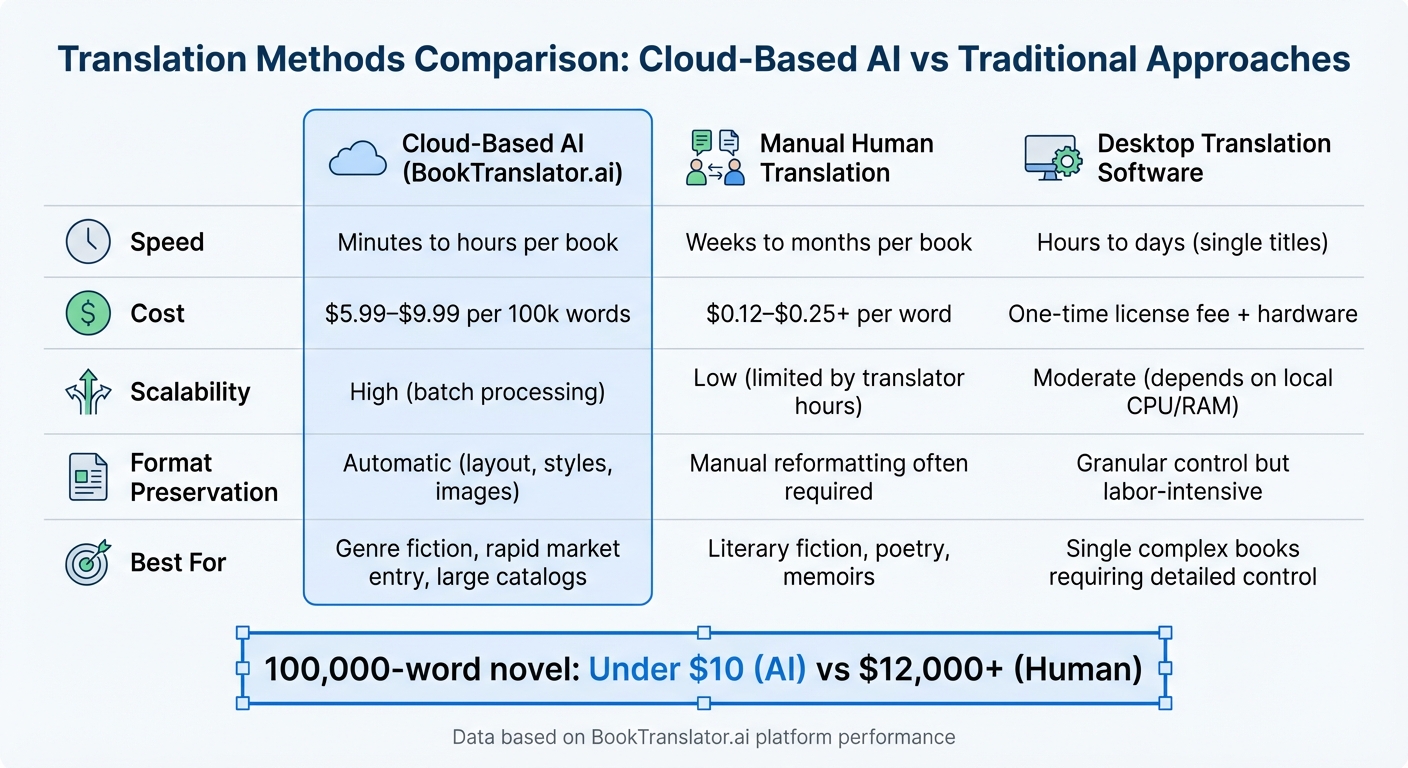
Cloud-Based AI vs Traditional Translation Methods Comparison
Benefits of Cloud-Based AI for Large-Scale Translation
When it comes to translating dozens - or even hundreds - of books, cloud-based AI brings speed and affordability to the forefront. BookTranslator.ai can process entire EPUB files in just minutes or hours, offering rates that are hard to beat - less than a penny per word compared to human translations, which typically cost between $0.12 and $0.25 or more per word [2]. The platform’s pay-per-book pricing eliminates those pesky monthly fees, while its robust cloud infrastructure allows simultaneous processing of multiple books without taxing your local system [2]. For U.S. publishers and authors, this means faster market entry and a streamlined way to expand their catalogs.
"This service is a game-changer. Processing multiple books (Korean, Japanese to English) was smooth. The layout consistency is key." – Min-jun P., Researcher [2]
This combination of speed and cost-efficiency is perfect for handling large-scale projects with ease.
Batch Translation and Workflow Management
For teams juggling extensive catalogs, a well-organized workflow is the key to saving time and maintaining quality. Grouping books by language pair and genre helps ensure consistent terminology and simplifies quality control. A straightforward naming system, like Title_LanguageCode_Date.epub, paired with a spreadsheet to track details such as source language, target language, word count, and costs in USD, can help keep everything on track.
The platform’s custom glossary feature is a major plus. It allows you to define key terms - like character names, fictional places, or technical jargon - so translations remain consistent across a series or multiple works by the same author. Before committing to a large batch, it’s a good idea to test the waters by translating a single chapter or sample. This ensures the AI captures the author’s tone and handles specialized vocabulary appropriately.
Comparison: Cloud-Based AI vs. Other Translation Methods
Here’s a quick breakdown of how cloud-based AI stacks up against other translation options:
| Aspect | Cloud-Based AI (BookTranslator.ai) | Manual Human Translation | Desktop Translation Software |
|---|---|---|---|
| Speed | Minutes to hours per book | Weeks to months per book | Hours to days (single titles) |
| Cost | $5.99–$9.99 per 100k words | $0.12–$0.25+ per word | One-time license fee + hardware |
| Scalability | High (batch processing) | Low (limited by translator hours) | Moderate (depends on local CPU/RAM) |
| Preservation | Automatic (layout, styles, images) | Manual reformatting often required | Granular control but labor-intensive |
| Best For | Genre fiction, rapid market entry, large catalogs | Literary fiction, poetry, memoirs | Single complex books requiring detailed control |
For publishers aiming to translate entire catalogs into dozens of languages, cloud-based AI offers the speed and consistency that manual translation or desktop software simply can’t match [2]. That said, for more nuanced literary works, a hybrid approach - using BookTranslator.ai for the initial translation and following it up with human editorial review - can strike the right balance between efficiency and quality.
Conclusion
Key Takeaways
BookTranslator.ai is changing the game for U.S. authors and publishers looking to bring their EPUB books to global audiences. This cloud-based AI platform offers unmatched speed, translating entire books in just minutes or hours - far faster than the weeks or months required by traditional human translation methods. And the cost? At just $5.99 to $9.99 per 100,000 words, it’s a fraction of what manual translation services charge, which typically ranges from $0.12 to $0.25 (or more) per word [2]. To put that in perspective, translating a 100,000-word novel costs under $10 with BookTranslator.ai, compared to $12,000 or more with human translators.
What’s more, the platform ensures your EPUB’s formatting, layout, and images remain intact, saving you from tedious reformatting work. Users have reported a 95% accuracy rate across various language pairs [2]. Glossary support is another standout feature, helping to maintain consistency for names, fictional places, and technical terms throughout your book. For publishers juggling large backlists or exploring new markets, the pay-per-book model is a game-changer - no recurring subscription fees, just pay as you go.
Next Steps
Ready to take the leap? Start by uploading a chapter or a shorter book to BookTranslator.ai to see the results for yourself. Sign up for a free account at https://booktranslator.ai, choose from over 99 target languages, and use the EPUB Language Compatibility Checker to ensure your file is ready [1]. The platform’s pricing structure is straightforward, so you can easily plan your project costs.
For more complex literary works, a hybrid approach might be the way to go: let BookTranslator.ai handle the initial translation, then bring in a human editor for that final layer of finesse. This method combines the speed and affordability of AI with the nuanced touch that certain genres demand. Plus, with a money-back guarantee, there’s no risk in trying it out while opening doors to new markets [2].
FAQs
How does BookTranslator.ai deliver accurate translations for EPUB books?
BookTranslator.ai utilizes cutting-edge AI technology to deliver translations that stay true to the original text. It carefully retains the meaning, tone, and formatting of the book, ensuring readers can immerse themselves in the story in their chosen language. For those seeking even higher accuracy, the Pro plan incorporates the latest AI developments to elevate translation quality to the next level.
How can I translate an EPUB file if it’s DRM-protected?
If your EPUB file has DRM protection, you’ll need to remove it before extracting the text for translation. To check if the file is DRM-locked, try opening or converting it in Calibre. If it’s locked, you have two options: purchase a DRM-free version or, where legally permitted, use a DRM-removal tool like the DeDRM plugin for Calibre to unlock the file.
After removing the DRM, import the EPUB into Calibre and convert it to an editable format like DOCX or TXT. This converted file can then be uploaded to BookTranslator.ai, which supports translations in over 99 languages. Once translated, replace the original text in the EPUB with the new version while keeping the layout and formatting intact. As a final step, validate the updated EPUB to ensure it complies with publishing standards.
How can I ensure consistent formatting when translating EPUB files?
To ensure translated EPUBs maintain their professional look, it's crucial to start with a clean, error-free source file. This minimizes the chances of formatting issues during the translation process. Tools like BookTranslator.ai make this easier by automatically preserving the original layout, including CSS, chapter organization, images, and links. After translation, use a tool such as EPUBCheck to identify any lingering errors. Finally, open the EPUB in an e-reader for a quick visual check to confirm everything appears as it should. Following these steps helps your translated EPUB mirror the polished appearance of the original.