
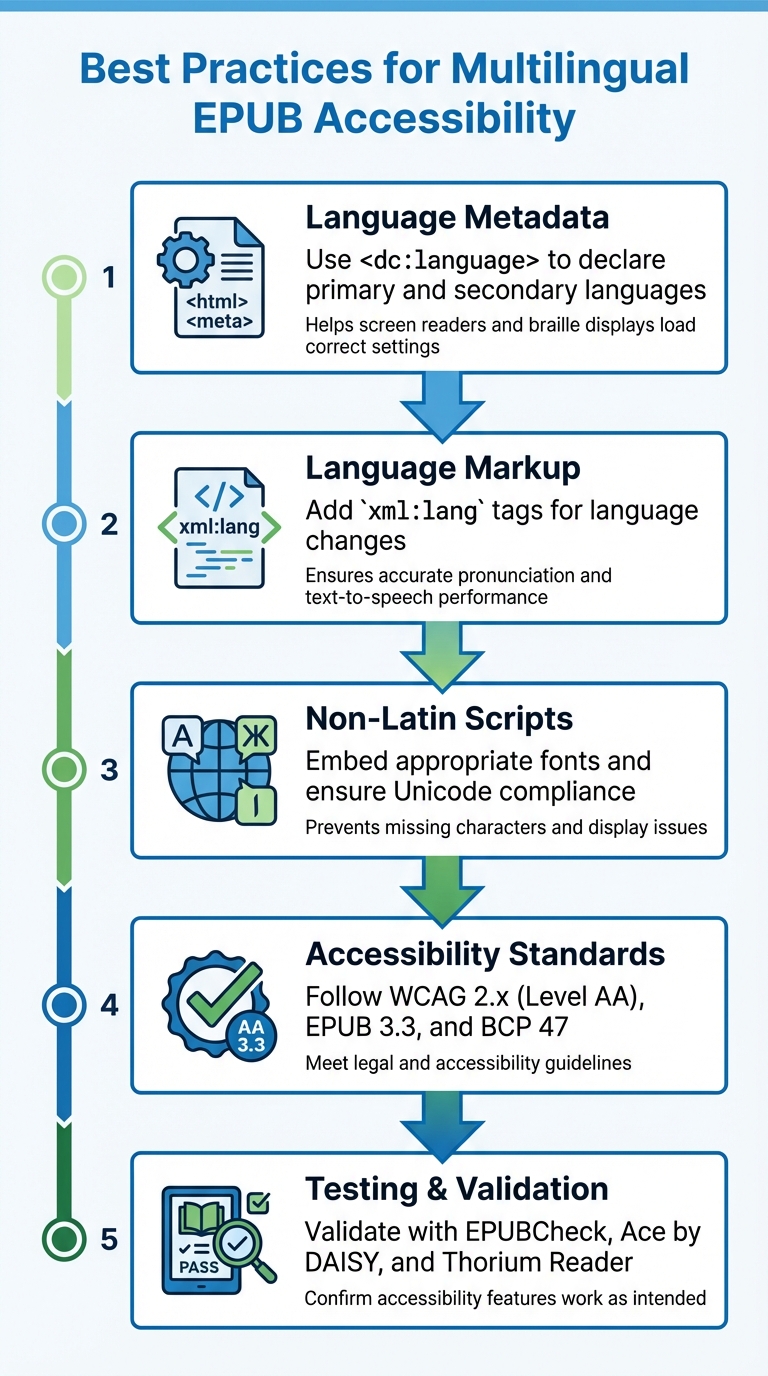
5-Step Process for Creating Accessible Multilingual EPUBs
sbb-itb-0c0385d
## Metadata and Language Declaration Setting up accurate metadata is the backbone of making multilingual EPUBs accessible. The `` or `
` instead of inline `` tags, as this improves compatibility with assistive tools. For non-linguistic content like ISBNs or part numbers, use the code `zxx` to indicate that the content isn't in any human language. ## Non-Latin Scripts and Character Sets Handling non-Latin scripts is essential to ensure accurate display and functionality in digital publications. Languages like Arabic, Chinese, Hebrew, and Cyrillic require precise technical setups to avoid display issues. Missing fonts or incorrect language codes can lead to "tofu" characters - those frustrating white squares or question marks that appear when devices lack the necessary fonts. To address this, EPUB 3 is often a requirement for these languages. Major retailers, including Apple Books, mandate this standard for languages such as Chinese, Japanese, Arabic, Hebrew, Dari, Kurdish, Pashto, Punjabi, Sindhi, Tajik, Uyghur, and Uzbek [3]. EPUB 3's native Unicode support is essential for presenting these writing systems accurately. ### Embedding Fonts for Non-Latin Scripts Embedding fonts ensures consistent display across devices. Tools like [Sigil](https://sigil-ebook.com/sigil/) and [Calibre](https://calibre-ebook.com/) simplify this process. For [Sigil](https://sigil-ebook.com/sigil/), follow these steps: 1. Add your font file (preferably in `.ttf` format) to the "Fonts" folder. 2. Declare the font in your CSS stylesheet using the `@font-face` rule: ```css @font-face { src: url(../Fonts/yourfont.ttf); font-family: "YourFontName"; } ``` 3. Replace all `font-family` references in your stylesheet with the name you defined. In Calibre, you can automate this by using the "Manage fonts" tool and selecting "Embed all fonts." For bilingual publications, include at least one Latin font and one non-Latin font. Always test your EPUB in industry-standard readers like Adobe Digital Editions (versions 3 or 4.5) to confirm characters render correctly. It's also important to avoid converting non-Latin text into images. Doing so makes your content inaccessible to screen readers and prevents users from resizing text, which can hinder accessibility. **A Note on Font Obfuscation:** The SHA-1 algorithm, currently used for font obfuscation in EPUBs, is being phased out. According to the [W3C Publishing Maintenance Working Group](https://www.w3.org/groups/wg/pm/): > NIST is advising that use of the SHA-1 algorithm [fips-180-4] be phased out by the end of 2030. The Publishing Maintenance Working Group does not intend to support font obfuscation in EPUB publications past that date due to its reliance on SHA-1 [4]. Once fonts are embedded, the next step is ensuring universal Unicode support. ### Unicode Compliance EPUB 3 requires universal Unicode support to maintain accurate character data across all reading systems. This eliminates the need for text images and ensures accessibility. To meet this requirement, encode all XHTML and CSS files in UTF-8. For right-to-left scripts like Arabic and Hebrew, use the `dir` attribute (e.g., `dir="rtl"`) to control text direction. Setting `dir="auto"` allows reading systems to apply the Unicode Bidirectional Algorithm, ensuring proper text flow. | Script/Language | Common Legacy Encodings | Unicode Standard | | --- | --- | --- | | Arabic | ISO-8859-6, Windows-1256 | UTF-8 / UTF-16 | | Cyrillic | ISO-8859-5, Windows-1251 | UTF-8 / UTF-16 | | Hebrew | ISO-8859-8, Windows-1255 | UTF-8 / UTF-16 | | Chinese (Simplified) | GB2312, GB18030 | UTF-8 / UTF-16 | | Chinese (Traditional) | Big5 | UTF-8 / UTF-16 | Use Unicode characters instead of images to preserve accessibility and text reflowability. For mixed-direction content, such as Arabic phrases within English sentences, leverage Unicode bidirectional control characters or appropriate HTML markup to ensure proper rendering. This approach maintains both functionality and readability across different languages and scripts. ## Testing and Validating Multilingual EPUBs After embedding fonts and ensuring Unicode compliance, the next step is to verify your multilingual EPUB's accessibility. This process ensures your content works seamlessly for all readers, including those relying on assistive technologies like screen readers or text-to-speech engines. Testing helps identify and fix any barriers that might limit access. ### Testing Language Markup with Validation Tools Start by running **EPUBCheck**, the official conformance checker for EPUB 2 and 3. This tool identifies structural errors that could disrupt rendering [7]. If you prefer a graphical interface, consider using **[Pagina EPUB-Checker](https://pagina.gmbh/startseite/leistungen/publishing-softwareloesungen/epub-checker/)** for easier navigation [9]. Once EPUBCheck confirms your file is error-free, move on to **Ace by DAISY**. This tool evaluates accessibility based on the EPUB Accessibility Specification. Simon Collinson, Content Sales Manager at [Kobo](https://www.kobo.com/us/en?srsltid=AfmBOophwsoccoMeAZyJt3JX8VNui9-HO4Kd765Z6T2xyk74eJqFpeIW), highlights its importance: > The really important thing about Ace is that it makes accessibility a concrete target with clear steps and a hierarchy of severity [5]. Ace is versatile - it can be used as a desktop application or integrated into automated workflows via its command-line version [5]. To ensure proper handling of language switching and text-to-speech (TTS) performance, test your EPUB with **Thorium Reader**. This application, which earned a perfect score for non-visual reading on epubtest.org [8], is particularly effective for these checks. Enable the "Enhance Screen Reader Experience" setting in the General Tab to verify that screen readers like JAWS, NVDA, or VoiceOver correctly switch voices for different language tags [6]. Additionally, test the "Read Aloud" feature to ensure proper pauses and accurate pronunciation, especially for non-Latin scripts. These steps confirm that your language tags and metadata are correctly guiding assistive technologies. Once these technical and accessibility tests are complete, proceed to a more detailed review of WCAG compliance. ### Checking WCAG Compliance While automated tools like Ace by DAISY provide a strong foundation, they can't fully evaluate WCAG compliance. A manual review is essential [5]. Start by systematically addressing any issues flagged in Ace's report, focusing on areas like duplicate IDs, which can disrupt ARIA attribute references and table headings - both critical for assistive technology. Next, visually inspect your EPUB in Thorium Reader to confirm that the layout, fonts, and navigation meet WCAG standards [6][10]. For multilingual technical documents, pay special attention to **MathML rendering and navigation**, as these are crucial for making EPUB 3 publications accessible [8]. Keep in mind that EPUBCheck has its limits - it won't fully validate CSS or detect JavaScript issues that might impact usability [9]. ## Using [BookTranslator.ai](https://booktranslator.ai/) for Multilingual EPUBs  BookTranslator.ai simplifies translating EPUB files while ensuring accessibility is never compromised. When creating accessible multilingual EPUBs, it's crucial to maintain the original structure, formatting, and language markup. This platform handles all of that seamlessly, offering translations in over 99 languages while preserving the layout and features that assistive technologies depend on. The tool adheres to BCP 47 standards, ensuring consistent and accurate language tagging throughout translations. It uses precise codes like *en-US* or *en-GB* for regional variations and script tags like *zh-Hans* and *zh-Hant* for different writing systems. Why does this matter? Proper language tagging ensures assistive technologies can switch languages smoothly and pronounce text correctly. As the [DAISY Consortium](https://daisy.org/) explains: > "Setting the language ensures that assistive technologies correctly interpret and render the text and that reading systems can make language enhancements available for users." - DAISY Consortium BookTranslator.ai goes beyond simple translation. It retains the original layout, correct language tags (like *xml:lang* and *lang*), and proper reading order to meet WCAG 2.x Level AA standards. Specifically, it aligns with Success Criteria 3.1.1 (Language of Page) and 3.1.2 (Language of Parts), ensuring accessibility is baked into every translated EPUB. The service is also cost-effective, starting at $5.99 per 100,000 words for the Basic plan and $9.99 per 100,000 words for the Pro plan. It supports files up to 50MB and even offers a money-back guarantee. This combination of affordability, efficiency, and accessibility makes it an excellent choice for publishers looking to scale their multilingual EPUB production without cutting corners. ## Conclusion Making multilingual EPUBs accessible ensures that all readers, regardless of their language or reading preferences, can engage with the content. The steps are simple but essential: specify the primary language in the metadata, use `xml:lang` attributes for language changes, include fonts that cover all necessary Unicode characters, and validate your EPUB using tools like EPUBCheck and screen readers. It's also crucial to meet **WCAG 2.x Level AA compliance**, as required by legal frameworks [2]. To achieve this, your EPUB should include three key Schema.org metadata properties: `accessModeSufficient`, `accessibilityFeature`, and `accessibilityHazard` [2]. As highlighted in the W3C EPUB Accessibility 1.2 specification: > "Only through the provision of rich metadata can a user decide if the content is suitable for them." [2] These standards ensure that language tagging works effectively, enabling assistive technologies like screen readers and Braille displays to interpret the content correctly. To verify smooth language transitions, test your EPUBs with tools such as NVDA, JAWS, VoiceOver, and TalkBack. Accessibility standards are always evolving, so resources like the [DAISY Accessible Publishing Knowledge Base](https://kb.daisy.org/publishing/docs/about.html) and the W3C Publishing Maintenance Working Group [1] can help you stay informed. By following these practices, you create a reading experience that's inclusive and seamless for everyone. ## FAQs ### How do I choose the right BCP 47 language tag for regional variants? When working with regional language variants, the **[IANA Language Subtag Registry](https://www.iana.org/assignments/language-subtag-registry)** is your go-to resource for selecting the correct BCP 47 language tag. These tags are made up of subtags separated by hyphens. For example: - **"en-US"**: Represents American English. - **"fr-CA"**: Represents Canadian French. To ensure your content is properly localized and accessible, select subtags that align with your audience's specific locale. If you're unsure, tools like *subtag search* can simplify the process of finding the right tags for your multilingual EPUB. ### What's the best way to handle mixed right-to-left and left-to-right text in one paragraph? To manage paragraphs with mixed right-to-left (RTL) and left-to-right (LTR) text, use the `dir` attribute on the relevant elements to establish the base text direction. Adjust this attribute for specific sections where necessary to ensure the text displays and reads correctly. Additionally, include suitable metadata and formatting to uphold accessibility and maintain consistent presentation throughout the EPUB. ### How can I test language switching with real screen readers, not just validators? Testing language switching with real screen readers requires using assistive technologies on actual devices instead of depending only on validators. This approach ensures the screen reader switches languages properly, pronounces words correctly, and adheres to the intended reading order. It's also important to manually check factors like text direction, pronunciation, and navigation across different languages. Finally, document your findings in detailed test reports to confirm accessibility standards are met.